
There are many websites or pages out there you do not want to visit either by your employes, young ones or some of your friends, or even you want to keep it secure at some specific computers. The reason behind that either the sites are harmful or may be restricted by other users.
There are hundreds if not thousands of third-party software programs that are available to block unwanted websites on your computer, some of them are free but most charge something.
You can block sites by redirecting them to the computer’s IP address that is used for a loopback network connection.
I am in this article going to tell you a simple way to block unwanted websites by making URLs of sites blacklist.
So don’t go away and stick to find out the complete and easy way to block sites on Chrome permanently.

Learn also to access blocked websites online for free.
How to Block unwanted websites on your computer:
Here is the step by step guide to block unwanted websites on your computer.
just follow the steps
- Go to My computer
- in address bar type C:\WINDOWS\system32\drivers\etc. and then press enter.
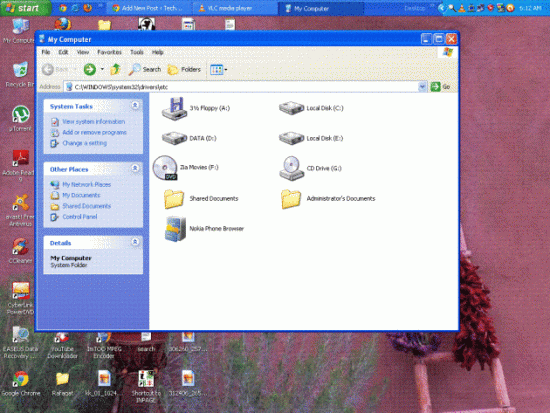
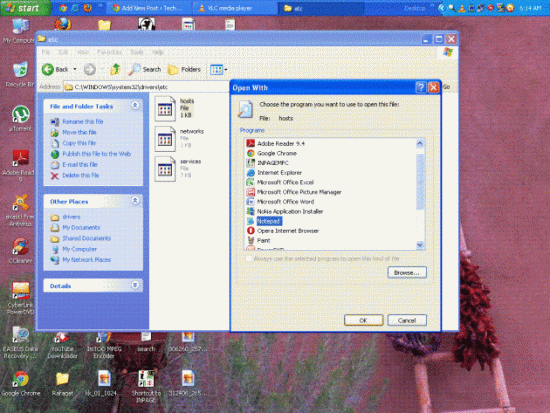
3 in the next windows right-click on the Hosts file, choose open and open it in note pad.
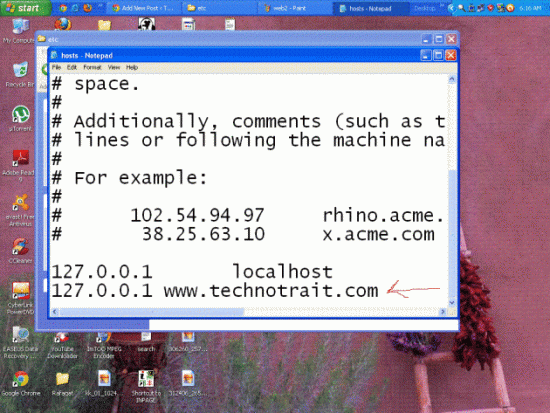
4 add the numbers 127.0.0.1 followed by at least one space followed by the URL, for example, www.technotrait.com you want to block. and save the document.
5 choose to allow if your antivirus alert
all have done, now you can check the website that you have blocked.
6 it will show the webpage is not available or oops your page is not available.
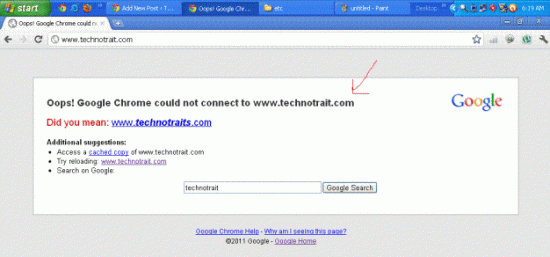
If you want to allow the site then just remove the name of the site from the windows (mentioned in step 4).
Don’t forget to learn to stop automatic page redirect to other websites.
If you like this article then do comments and also mention any other way/method to block unwanted sites on Chrome or computer.