
Wallpapers are the computer background images that appear on the screen whenever you see the display. Sometimes you have selected a certain Desktop wallpaper and want to keep it there, or you do not want to permit anyone to change it.
If so, then this article will give you an opportunity to lock your desired desktop wallpaper and keep it as long as you want.
Must Read: How to activate Windows XP without a genuine key
How To Lock The Desktop Wallpaper :
Do you want to lock the desktop wallpaper so that no one will be able to change it without your permission?
Here is the solution: just follow the steps:
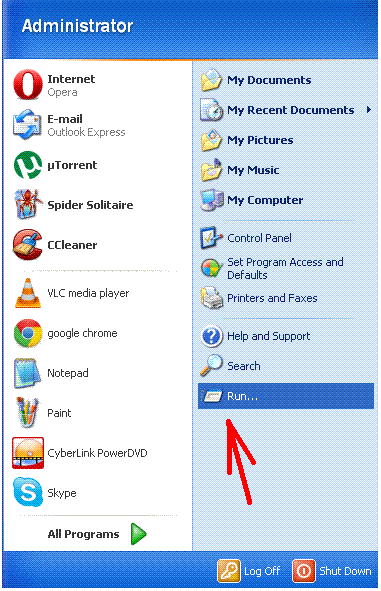
1 – Click the ‘ Start ‘ button and click ‘ run ‘
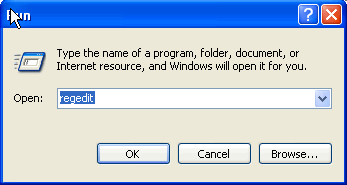
2 – Type in ‘regedit’ in the text box.
3 – Then search along the path: HKEY_CURRENT_USER \ Software \ Microsoft \ Windows \ CurrentVersion \ Policies \ ActiveDesktop
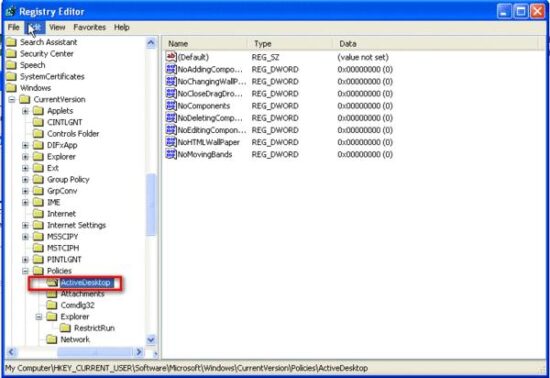
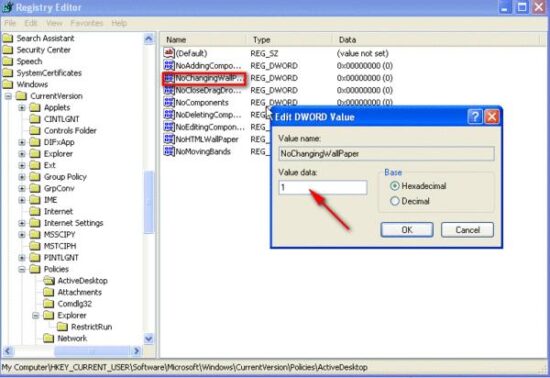 If there is no option, you can click the blank pane with the right button and select ‘New’ and then click ‘DWORD Value’, which is named ‘NoChangingWallPaper’, and set the value to’1′, then the desktop wallpaper is locked. Do not forget to reboot the computer.
How to Unlock the Computer Wallpaper:
If you want to unlock your computer wallpaper, simply follow the steps:
Navigate to HKEY_CURRENT_USER \ Software \ Microsoft \ Windows \ CurrentVersion \ Policies \ Active Desktop
Set the DWORD value to be 0 or delete the DWORD altogether (don’t forget to reboot).
So that’s all, try this method and give me your feedback.