Category: TECH NEWS

Posts about technology news

  • Top 10 Sites Like Craigslist to Sell and Buy Products Online

    Top 10 Sites Like Craigslist to Sell and Buy Products Online

    Looking for some sites like Craigslist or want some alternatives to Craigslist to advertise your products online, then this topic is for you.

    No doubt, Craigslist is assumed to be the best place for product advertisement, due to its clear layout and advanced site-identifying technology. Also, several market advertisers prefer to promote their product locally on Craigslist. Being internet marketers, we want to sell our products on some suitable websites online.

    Although there are a lot of website alternatives to Craigslist available, we will rely on such that will not only boost our business but will also bring valuable customers.

    However, there are some people who are not satisfied with their advertisement technology and other business features.

    So that’s why I have compiled a detailed list of sites like Craigslist that will bring new opportunities to promote your business locally as well as internationally, with the target audience.

    sites like craigslist alternatives

    Read Also:  Top Free Proxy Sites List

    Top 10 Sites Like Craigslist to Sell and Buy Products Online:

    Here is the detail of Sites Like Craigslist to promote your business online securely and confidently, don’t miss visiting these Craigslist alternative websites.

    1 – City News

    It is also the most Popular Website Like Craigslist. The user can find ads from local listings, especially from the USA, Canada, Europe, and other Asian countries as well. The best thing about City News isthat  each classified ad creates a one-page website where you can post your ads along with the relevant image, video, and description.

    It also offers a Paid ad with nominal charges and will provide you the liberty to see your ads locally as well as internationally.

    2 – Recycler

    It is one of the best USA-based sites. It was started in 2010 and provided a good space for business. Whether you want to sell your house or use a car or are looking for someone to hire your property, then Recycler is the best for you.

    When you sell on Recycler, you can quickly post your listings on Facebook and Twitter. To boost your exposure on Recycler, it’s also possible to use paid ads to target specific buyers or markets.

    3 – Close5

    Close 5 is formerly known as eBay classifieds, it is also a good place to find good customers or your products online, especially if you are in the USA Moreover, there is a listing for other products worldwide.

    The best thing among other sites like Craigslist is its user-friendly customer approach to selling products. The details of each product are under its display picture,  so it will become easy for the customer to approach the products and their price.

    4 – Ads Globe

    It is also one of the famous websites for Craigslist alternatives.

    The best thing about Ads Globe is its automatic location detection, while signing in through Facebook will automatically detect the user’s location and then Post or show ads accordingly. You can easily post unlimited free ads in any category, such as real estate, events, business, dating/personal, pets, travel, jobs, and others.

    5 – Hoobly

    With a simple design and easy search approach, Hoobly has become one of the popular portals to buy and sell products online. Being Craigslist alternatives, there is a lot of opportunities both for the seller and buyer to search and find their products. One can see the category of each listing to find a suitable product.

    There is also an option of posting free ads, where a visitor can post a free ad to sell their products worldwide.

    6 – BackPage

    BackPage is another famous website to sell and buy products and items, especially while living in the USA, Canada, Europe, and even worldwide.

    Each category is listed by country and then city, and vice, so it is a great place for local listing. Also, the user has a great variety to choose from by promoting their listing with a picture, a short video, and using free ads along with a description.

    7 – Oodle

    Ooodle is a slightly different marketplace to promote websites like Craigslist. You can find your listing as well as listings from other relevant sites, which will provide a good variety to choose the products.

    The best thing is its social media interaction; you can use your existing Facebook account to log in and post your ad on this website.

    8 – Penny Saver USA

    As my name, Penny Saver USA is an online listing website that is especially to promote business locally in the USA. Being a great opportunity for advertisement on sites like Craigslist, it has been popular in the country for over 50 years.

    To post ads, you must first sign in and then advertise. There is also a newspaper edition along with their online Portal, where you can find your local listing.

    9- US Free Ads

    US Free Ads is also a free classified ads site. You can sign in to post free ads and search for a variety of other products like houses, cars, pets, and a lot more.

    Although it is not very attractive, however, the user can find much of his interest. Also, one can get more benefits by signing up for a paid account.

    10 – Locanto

    Locanto offers classified advertisements in over 60 countries around the world.

    You will probably have the best opportunities with Locanto if you live in Los Angeles, Miami, or New York, as those are their featured boards.

    It is free to post your ad to a city board, but you can pay extra to extend the advertisement to additional cities, remove third-party ads from your listing, or send your ad to the top of a buyer’s search results.

    The above listing of sites will allow you to sell and buy your products online at the local listing as well as worldwide.

    Do Visit: List of websites to watch Live TV Online

    Do comment if you have any queries or update the topic.
  • Best Remote Desktop Software – Teamviewer alternatives

    Best Remote Desktop Software – Teamviewer alternatives

    The remote desktop software is a great way to access the computer remotely and manage the files and data according to your wish.  The remote access is not time or place limited, but all you need is some best remote desktop software and let the files and data be shared with your friends and family with quiet confidence.

    Also when talking about the developers and master trainers, this remote desktop software considers as key to success, also, remote desktops are an excellent way to expedite the deployments for developers.

    Remote desktop applications are used to remotely configure data centers and are the standard in industrial applications.

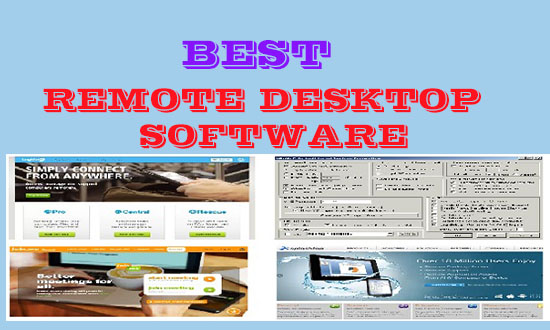
    best remote desktop software teamviewer alternatives

    Read Also: Free Keylogger Software to Monitor activities of Young ones and employees

    Why the need for Teamviewer alternatives as remote desktop software?

    When talking about some reliable and secure remote desktop software, the name Teamviewer is flashed in our mind, although it is a good software to access computers remotely.

    But there are some issues…

    Security is one primary concern that causes many users to flee from TeamViewer. If the average user doesn’t configure the settings on this tool correctly, their system is directly put at risk. Also, for some time, TeamViewer has been the target for hackers to steal important data from other computers.

    So there should be some TeamViewer alternative software to access and share files with your loved ones and professionals with confidence and security.

    Best Remote Desktop Software as TeamViewer Alternatives:

    Here is a collection of the top 5 free best remote desktop software to access computers remotely alternative to TeamViewer.

    1 – Windows Remote Desktop Connection:

    Windows Remote Desktop is free software built in for both Windows and Mac users. Its ultimate and business versions can give free and complete access to data. The best thing about this remote desktop software, it is easy to use both for beginners and amateur users.

    The settings can easily be configured from the control panel. The router of the remote PC needs to be routed to port 3389 to direct it to your PC. However, this tool is not capable of controlling multiple PC control at a time.

    Visit the website

    2 – Join.me:

    Join.me is a free and also a premium remote desktop software to allow multiple computers to communicate at the same time, especially for conferences and meetings. Being equally usable on Windows and Mac, the users can have unlimited audio calls, audio recording, can schedule meetings with one click.

    Service is free for basic VoIP; however, paid users can have more access to multiple computers ( more than 250) at a time, along with other advanced management.

    Visit the web to have the Remote Desktop software.

    3 – Splashtop:

    Splashtop is a free and Paid software that can be used on Android and IOS as well as on Windows and Mac. It is also easy to install and configure. The user can talk to up to 5 computers at a time in the free versions; however, the number of persons and security can be even more by having its paid versions.

    There is minimum latency on audio and video streaming, so that makes it easier for you to even enjoy your media remotely.

    Visit to download the software.

    4 – Real VNC:

    Real VNC provides both free and paid remote desktop software services. The best thing is that it can be used on multiple Operating Systems other than Windows and Mac, including Linux, UNIX, Ubuntu, and Raspberry Pi.

    The software uses the Virtual Network Computing (VNC) protocol to remotely control another computer’s screen.

    Somewhat more complicated than setting up TeamViewer, RealVNC offers dependability and features like cross-platform remote control, VNC authentication, encryption, file transfer, collaboration tools, and chat, to ensure that your remote connection bodes well for the person on the other end of it.

    Check this link to download the remote desktop software.

    5 –  Ammyy Adminn :

    Ammyy Admin is a free and the best remote desktop software to communicate with computers safely. Being applicable both for Windows and Mac, it can give users to have full access to another screen. Unlike other heavy software, which is difficult to configure, It comes under the size of 1MB.

    In addition to remotely connecting to the other system, you can perform actions like file transfers and live chat.

    Supported by Windows, secure connection, and easy-to-manage software makes Ammyy Admin is one of the most preferred free remote desktop clients.

    Although it is free software for Personal use only, business and premier versions are also available.

    Visit the page to download the software.

    In spite of the above there is a number of other best remote desktop software listed below:

    1. Ultra VNC
    2. LogMein Pro
    3. WebEx Free
    4. Chrome Remote Desktop
    5. Mikogo

    Hope so you have got enough knowledge about the TeamViewer alternative software. Do comment with your feedback.

  • Best Free Music Download Sites for android Phones and PC

    Best Free Music Download Sites for android Phones and PC

    Best Free Music Download Sites for Android phones and PC with a lot of free audio collections to use for everyone.

    While working on YouTube or any other video-sharing website, we often need some free music to be used as background tracks. Although there is a mass of music available to download, due to copyright issues, it is a little bit risky or illegal to use music from these websites.

    In spite of these, there are a lot of free music download sites are available on the internet, and mostly can be found under the Creative Commons license. One can download audio tracks from these sites and use them as background music while editing videos.

    The best part of these free music sites is that there is a huge collection of tracks, including hip-hop, rock, jazz, etc., available to download, which is fully organized by category and artist. Moreover, the sites listed usually have updated audio stuff nearly on a daily basis.
    best free music download sitesYou can also track suggestions as per search and interests, which will make them a favorite.


    Best Free MP3 Music Download Sites online:

    Here is the collection of free music download sites, just download free mp3 audio online and use it as you want.

    1 – Jamendo:

    It is perhaps one of the best music download sites to provide free songs and much more. There are more than 4,80,000 tracks available to download. Most of the content is available under the creative commons license. So one can use them legally, and there will be no issue downloading any audio from this site. You can search by genre or by artist for the huge collection of tunes and tracks.

    Jamendo music downloads site

    The user can also share his own music or track on the themed radio station provided on this site.

    2 – Last.fm:

    By name, it is not an FM Radio station, rather than it is an online streaming site to listen to MP3 music online. For its lover, it doesn’t bother to register at the site to get free mp3 songs, but just find its downloading section, chooses the track, and hit download to make its own.

    last fm free music download site

    3 – Sound Click:

    Another free music download site that has a huge collection of mp3 available. It is one of the oldest online libraries, serving over 5 million full tracks available. Not all audio melodies provided on the site is free but still one can find a section having millions of free audio to download.

    Don’t miss to check these beat maker software for windows users.

    sound cloud free mp3 music site

    Like other music downloading sites, it has also a radio station. The best part is that one can save its free streaming music online and can listen to it later at their will.

    4 – Audio Archive:

    It is also a free downloading music site with more than 2 million audio files available to use on Android and pc.

    audio archive free music download site

    One can find audio tracks and libraries including golden radio memories. For audio fans, the most attractive part of this audio downloading site is its live audio archive. So waiting just click on any site to start downloading MP3 songs.

    5 – Pure Volume:

    Pure volume is a library that has a huge collection of audio by thousands of singers worldwide. One can use its search feature to find its favorite tracks sung by the artist, and also can download what is most listened to or popular in its genre.

    pure volume music download site

    Not every track is available to download, but still we can find hundreds and thousands of melodies to get from this website.

    Above is the collection of free music download sites; there are also many sites available to use free online mp3 music.

    I hope the above info will help next to choose a background audio track for your YouTube video or any other video while editing.

  • 3 Safe Ways to Download any Video online from any Website

    3 Safe Ways to Download any Video online from any Website

    Watching videos online is easy, but sometimes you want to save a video to watch later without an internet connection. This can be useful for educational content, personal projects, or offline viewing when your internet is slow or unavailable.

    However, many people don’t realize that downloading videos from websites is not always allowed. Some platforms restrict downloads due to copyright rules and terms of service. That’s why it’s important to use safe and legal methods that respect platform policies.

    Although a website like YouTube has introduced an offline mode to save videos, many video-sharing websites still do not provide the ability to download videos online directly and watch them later in offline mode.

    There is also trial software that lets you download a video from any website, but most users might not be able to afford the paid version, although a cracked version is available. As you know, this illegal software might be harmful to your device or operating system.

    ways to download any video online from any website free
    Today, I’ll share some of the best free online video grabber software/websites to download any video from any website and watch it later.
    Read Also: How to Embed YouTube Video with Sound Muted

    How to download a video online from any site for free:

    In this guide, you’ll learn practical and responsible ways to save online videos for offline viewing. These methods focus on official features, browser tools, and legal alternatives that don’t put your device or account at risk.

    1- Online Websites to download videos from any website:

    Here is a collection of all those websites to download videos for offline mode.
    Savefrom.net: This is a third-party website for downloading videos. Copy the URL of the video > open Save from Website> Paste the link there and wait for the download link to appear. Just click on the link to get your desired videos straight to your Android device.

    You can also use the Google Chrome extension to download videos online from any website.
    Clipconverter.cc: As the name suggests, this is an online video downloading site, and along with this, it will also convert the video to our desired format. The method is quite simple: just copy the address of the video to download > open the clipconverter,> Paste the address, and hit the button to download the video.

    Some other examples of online video downloaders are:

    1. FastestTube:
    2. Download Twitter Video:
    3. Instagram Downloader:
    4. FB Down:
    5. FB Down Private:
    6. Y2Mate:
    7. Yoo Download:
    8. Keep Vid

    There is also a list of websites to download a video from any website, just check it.

    2- Use Google Chrome Extensions or Add-ons to download videos:

    Besides online websites, there are also some Google Chrome Extensions and Add-ons to download videos from a website.
    Google Chrome Extensions: Search for “Videodownloadhelper” in the Google Chrome Store (just as an example).

    Install the extension. Now open the video to download > Click on the right corner at the new extension icon > select the video format to download, the video will soon start downloading in your required format.

    There is also a huge list of Chrome extensions to download a video. Just select your own choice and start downloading videos.
    Mozilla Firefox Add-ons: Firefox is another popular browser, so select video downloader add-ons of your own choice and download videos from any website online for free.

    3- Using Online Video Grabber software to download videos online from Streaming Websites:

    There is a lot of software available to download videos online from websites for free.
    YTD: YTD or YouTube video downloader online is used to download any YouTube video, but it will also support videos from Facebook and other social media sites.

    To download the software > open the video to download > copy the address,> Paste in the software, and let the online video grabber software download the video from the website in the best format.
    IDM: Internet Download Manager is a third-party software to download not only videos but also files of every kind.

    So just get the trial version and enjoy the videos in offline mode.
    There is also plenty of software available to download videos, just Google ” software to download videos” and select the desired one to download videos of your own choice.

    Common Problems and Solutions

    1. Video download option not available

    Some websites simply don’t allow downloads. In such cases, use offline viewing features or screen recording.

    2. Poor video quality

    Official downloads usually offer the best quality. Avoid low-quality tools.

    3. Security warnings or pop-ups

    If a tool or website shows excessive ads or warnings, avoid it immediately.

    4. Download fails frequently

    This may happen due to browser issues, network problems, or unsupported websites.

    If your PC performance affects downloads, you can also check our guide on Windows 11 performance optimization.

    Frequently Asked Questions (FAQ)

    Is it legal to download videos from websites?

    It depends on the website and content. Always follow copyright laws and platform rules.

    Are online video download tools safe?

    Some are safe, but many are risky. Avoid unknown websites and pirated software.

    What is the safest way to save videos?

    Using official download features or screen recording is the safest approach.

    Can downloading videos harm my device?

    Yes, unsafe tools can contain malware. Always use trusted methods.

    Final Thoughts

    Saving online videos can be useful, but it should always be done responsibly. Instead of using risky websites or illegal tools, focus on safe and legal methods that protect your device and respect content creators.

    Do comment with your feedback.

  • Use Google Chrome Password Manager to Show Saved Password

    Use Google Chrome Password Manager to Show Saved Password

    How to Use Google Chrome Password Manager to Show Saved Password hidden under asterisks is the topic of today.

    While using Personal Computers/Laptops in Office or home, we usually save the passwords for our most visited websites like Facebook, Gmail, etc.

    Although that is not a good practice, because someone may use our system in our absence and can steal important info, somehow if we wish for our ease to not remember the Password and also not to type the password again and again in the presence of another person due to security reasons.

    So in case, we want to log in to these websites other than home or office or on some other devices, then there is a chance that we have forgotten the Saved Password and there is nothing except asterisks.

    Use Google Chrome Password Manager to show Saved Password Hidden under asterisks

    But don’t worry, the topic of today is for you, and after going through the topic you can easily see the hidden password in Google Chrome Browser. Although there are many online applications, software, and maybe Google Chrome extensions this trick is easy and without any risk.

    How to Use Google Chrome Password Manager to Show Saved Password hidden under asterisks:

    Use the following simple steps to show saved passwords hidden under asterisks using Google Chrome Password Manager:

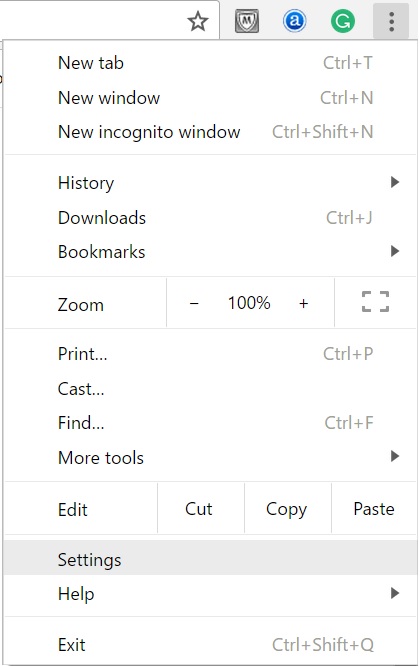
    1 – Open Google Chrome and Go to the three vertical lines at the top Right Corner of the Google Chrome browser.

    2- In the Menu Click the Settings

    chrome password manager

    3- In the next window scroll down and click on “Show advanced Settings

    4- Scroll down and click on “Password Manager

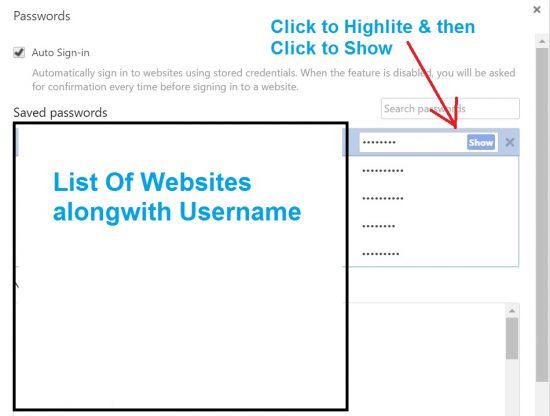
    5- A new Windows will open that will display Login Details of all websites whose Password was saved on the computer.

    Chrome Password Manager Revealer

    6- Just click on the web whose Password you want to know and click on “Show”.

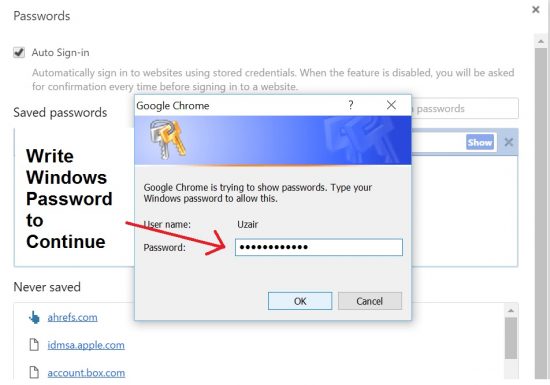
    7- A Windows security alert may appear to tell you that Google Chrome is trying to show a Password, so type Windows Password to allow

    this.

    8 – Just Type the Windows Password and hit Enter.

    Chrome Password Manager Settings

    9- The Password under asterisks will be shown. You can click to hide it again.

    Learn to fix why a site cannot be reached in Google Chrome.

    So in this way you can show any saved password hidden under asterisks using Google Chrome Password Manager.

    Watch the video to understand the use of Google Chrome Password Manager.

  • Google search “Find My Phone” to locate your missing android Phone

    Google search “Find My Phone” to locate your missing android Phone

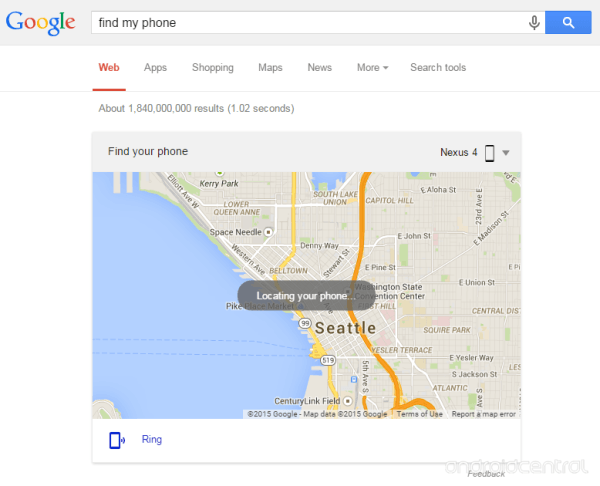
    Google has improved its search ability to track or locate any android phone named by “Find My Phone” in its search bar. Android Device Manager is the improved source to use service of find my phone more effectively.

    Somehow or what you have lost or cannot locate your phone, then before taking any legal action, you may consult Google about it…yes, it is because now you can simply track your lost Android phone with their free search function named as find my phone. With this, you can easily track any phone and tablet on the Google map without knowing imei number of the phone.

    Don’t Miss: Trace any ip address using Facebook chat

    find my phone

    How to use Find My Phone to locate a missing Android phone:

    It is as easy as 123 to locate your Android phone online for free with the help of Google search ability and “Android Device Manager“, just follow the steps:

    1. Log in to your Gmail account (that you have used to set up in the Google Play Store)
    2. Search “Find My Phone” in the Google search bar and wait to display the phone associated with the email address.
    3. If you have more than one phone, then you can select that one from the right drop-down menu.
    4. Wait to see the blue circle showing the location of your phone (with accuracy of 15-20 meters)
    5. You may also hit the Ring button to ring your phone (this will be helpful if you are unable to locate your phone nearby, you as at home or office)
    6. So see the phone and enjoy its location accuracy.

    By using Android Device Manager, you can also locate the last online time and other features.

    Reasons why you could not locate your Phone:

    Let’s say you have repeated the above processes, but still could not fetch the exact location of your Android phone, then it might be due to:

    • Your Phone is switched off
    • Your phone’s GPRS/WiFi is off or out of range
    • Your device’s GPS is off

    So, try to check this fun utility to find your Android phone.

    image credit:androidcentral