Category: TECH NEWS

Posts about technology news

  • Top Free Proxy Sites List – Best Proxy Servers List

    Top Free Proxy Sites List – Best Proxy Servers List

    Use top Free Proxy Sites along with the Best Proxy Servers list from the USA, UK, and other major countries to access banned websites in your school, college, or even country.

    Free Proxy Sites and Best Proxy Servers Lists are just like the oxygen for internet users,

    Especially when we try to access some useful websites like video, social, or Gaming, which are blocked by  Govt, the ISP, our office, university, college, or even the cafeteria, then is a little bit of panic without accessing these sites.

    It is necessary to have some free proxy servers, so that we can access them from any location.

    The best part of those proxy servers is that they are totally free to use, and most of them are online at all times.

    So we need not worry now about any of our websites that we can not open or access. Along with the proxy servers, other services like VPN’s can be used to bypass the proxy.

    Before proceeding towards the best Proxy Servers List, let’s see how these Free Proxy Servers work.
    free proxy sites list
    free proxy servers list

    How a Proxy Server Works:

    Whenever we access a specific or blocked website by using a Proxy website, it will hide our identity or IP address and access the website by using some specific or dedicated servers or IP addresses other than we are using.

    It is working on the back end as the reverse proxy and working as an intermediate source between us and the Proxy Server.

    Mainly, the Free Proxy servers are from that country where the blocked website can be accessed in the normal way.

    Must read to resolve the IP address conflict in networking

    Also, the list is just to help access some blocked websites, although all free proxy sites are working rather than if one is not responding, you can try another.

    Best Proxy Servers List to access any blocked website online:

    Here is the list of the best working free proxy Servers.

    HideMyAss – https://www.hidemyass.com/proxy

    Free Open Proxy – http://freeopenproxy.com

    Hiload – http://hiload.org

    Proxify – http://proxify.com/p/

    Proxy 2014 – http://proxy2014.net

    kProxy – http://www.kproxy.com/

    Unblock YouTube Free – http://unblockyoutubefree.net

    Zfreez – http://zendproxy.com/

    BlewPass – http://www.blewpass.com/

    Unblock My Web – http://www.unblockmyweb.com/

    4everproxy – http://4everproxy.com/

    Vtunnel – http://vtunnel.com/

    Free Proxy Server – http://freeproxyserver.uk

    Working Proxy – http://workingproxy.net

    Ninja Clock – http://ninjacloak.com/

    Proxy.org – http://proxy.org/

    YouTube Free Proxy – http://youtubefreeproxy.net

    AnonyMizer – http://www.anonymizer.com/

    WebProxy.net – http://webproxy.net/

    YouTube Unblock Proxy – http://youtubeunblockproxy.com

    Unblock YouTube Beat School – http://unblockyoutubeatschool.com

    Free YouProxyTube – http://freeyouproxytube.com

    AnonyMouse – http://anonymouse.org/

    HideOnline Proxy – http://freeyoutube.net

    Free YouTube – http://freeyoutube.net

    New Ip Now – http://newipnow.com/

    Defilter – http://defilter.us

    Unblocker – http://unblocker.us

    Quickproxy – http://quickproxy.co.uk

    The Best Proxy – http://thebestproxy.info

    Don’t Filter – http://www.dontfilter.us/

    Fast USA Proxy – http://fastusaproxy.com

    Just Proxy – http://justproxy.co.uk

    Proxy-2014 – http://proxy-2014.com

    VPN Browse – http://vpnbrowse.com

    ProxyOne – https://proxyone.net

    Web Proxy Free – http://webproxyfree.net

    Can’t Block This – http://cantblockthis.org

    Vobas – http://www.vobas.com/

    Proxyo – http://proxyo.info

    Hide The Internet – http://hidetheinternet.com

    Greatest Free Proxy – http://greatestfreeproxy.com

    Rapid Proxy – http://rapidproxy.us

    Hiding Your Info – http://hidingyour.info

    Proxay – http://www.proxay.co.uk

    ViewTube – http://viewyoutube.net

    PRO Unblock – http://pro-unblock.com

    Proxy 4 Freedom – http://proxy4freedom.com

    WebSurf Proxy – http://websurfproxy.me

    F4FP – http://f4fp.com

    TiaFun- http://tiafun.com

    HideMyTraxProxy – https://hidemytraxproxy.ca/

    Working Proxy – http://workingproxy.net

    EXCS – http://ecxs.asia

    Star Doll Proxy – http://stardollproxy.com

    HideMyAss UK – http://hidemyass.co.uk

    Fish Proxy – http://fishproxy.com

    DZ Hot – http://dzhot.us

    US Proxy – http://usproxy.nu

    You Liaoren – http://youliaoren.com

    Zacebook PK – http://zacebookpk.com

    Proxys – http://proxys.pw

    Justun Block IT – http://justunblockit.com

    FB Proxies – http://fbproxies.info

    1FreeProxy – http://1freeproxy.pw

    Sporium – http://sporium.org

    Suede Proxy – http://suedeproxy.info

    To Proxy – http://toproxy.co

    London Proxy – http://londonproxy.eu

    Kr Proxy – http://krproxy.info

    Proxy Browse – http://proxybrowse.info

    Proxy Internet – http://proxy-internet.info

    CA Proxies – http://caproxies.info

    Proxy 2015 – http://proxy-2015.info

    German Proxy – http://german-proxy.info

    Surf For Free – http://surf-for-free.com

    PRO Intern – http://prointern.info

    Fast Time – http://fasttime.info

    Host App – http://hostapp.eu

    Fun Proxy – https://funproxy.net

    Canada Proxy – http://canadaproxy.info

    US Proxy – http://usproxies.info

    Network ByPass – http://networkbypass.com

    Go Proxy – http://goproxy.asia

    Zalmos – http://zalmos.com

    Spedo – http://spedo.co

    Proxy This – http://proxythis.info

    Jezus Loves This Proxy – http://jezuslovesthisproxy.info

    Intern Cloud – http://interncloud.info

    PHProxy – http://phproxy.co

    Saoudi Proxy – http://saoudiproxy.info

    America Proxy – http://americaproxy.info

    PK Proxy – http://pkproxy.info

    Travel VPN – http://travelvpn.info

    Hidden Digital – http://hiddendigital.info

    Me Hide – http://mehide.asia

    Brazil Proxy – http://brazilproxy.info

    Proxy Call MeNames – http://proxmecallmenames.com

    kProxy Site – http://kproxysite.com

    Xite Now – http://xitenow.com

    Although in the above Free Proxy servers list, all Proxy websites are free to use rather than it is recommended not to open any website that requires your account or any other financial details, because they may steal your info.

    Also, if you find any Proxy site not responding, then do comment to me and share if you know some other free proxy server.

    <image credit: techgyd>

  • Google Project Glass Will Finally be Made in USA

    Google Project Glass Will Finally be Made in USA

    Google Project Glass was introduced by Google in last year. Being one of the unique projects by Google, many eyes were still waiting for it, although Google had introduced it in their headquarters in California. But still, he decided to manufacture it only in the USA. Google Project GlassSo it will be great news for the American citizens that this Google Project Glass will be introduced to the world from their homeland.

    It was again claimed by Google that there will be no more waiting and launch the Google Project Glass by the end of 2013.

    When talking about the situation of its production in other the USA, some opposition was seen to make this product other than the USA, so Google has decided to launch their innovative product from their headquarters in California. Only a few thousand will be produced by Foxconn this year.

    What is Special In Google Project Glass.

    Let’s have a look at this innovative device, Its inbuilt camera is controlled by voice recognition software and can send photos and videos directly to the web, via a connected smartphone, while a small prism-like screen above the wearer’s right eye displays search results and can send them directly to the internet.

    There also news for those who are already using glasses, that Google will ensure to do something more for them.

    What is special you can do with this product is by saying ok:

    • can make and receive a call
    • can send messages
    • can schedule your meetings, gossips or even more.
    • can track the location of your favorite place through GPS
    • can also record by using a built-in video camera.

    Take a video review


    Want to Know More about Project Read: Google Project Glass – Smart Project by Google Revealed

    Google Project Glass Price:

    When talking about the price, each pair of this product is expected to retail for around US$1,300-1,500.

    Although Google has discontinued the project, still the elaborate information is for the interest of tech users.

  • Use NFC Smartphone to Control Your Hyundai Car

    Use NFC Smartphone to Control Your Hyundai Car

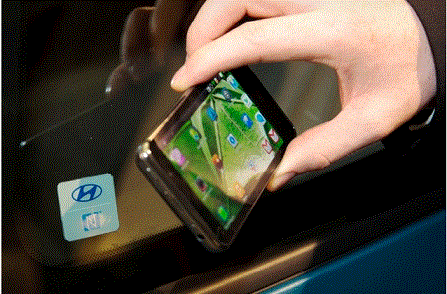
    Have you ever think of controlling your Hyundai car with an NFC Smartphone? If not, then just try to connect your NFC smartphone and through your keys in the ditch. But who has claimed…nothing other than Hyundai company, and the company wants drivers to forget all about the metal set of keys they’ve been lugging around for years; in the future, you’ll need only an NFC smartphone to control your car.

    Hyundai sampled the technology earlier this week on its New Generation i30, though it wouldn’t offer up pricing details or confirm which vehicle models will ultimately be receiving the package.

    Read Also: Google Project Glass – Smart Project by Google Revealed

    hyundai nfc smartphone

    It will be more sophisticated than the previous technology revealed by Lockitron to unlock your door with your smartphone.

    How an NFC Smartphone Controls a Hyundai Car:

    The company claimed that through NFC, each vehicle will be able to save custom user profiles” based on the specific smartphone being used. So the car could theoretically set your mirror positions, seat inclination, and preferred stereo volume before you even strap on a seat belt. Much like Toyota’s Qi approach, a built-in inductive charging plate would provide power to compatible devices on the move, with the car’s touchscreen displaying your contacts, music library, and other personal data.

    Although there are a number of ways to use NFC for mobile payment,data transfer,as a QR code,just in security and much more …..hope so the time will come when the technology will be limited to a handy smartphone and life will become much easier and fast.

    Read more about the use of NFC in Daily life

  • Bicycles will get automatic transmission by Smartphones

    Bicycles will get automatic transmission by Smartphones

    It was the time when riders relied on the gears of bicycles, but now technology has changed, and bicycles have an automatic transmission that can be controlled by any smartphone. This was all done by the first automatic gear developed by UK Cambridge consultants. Who was working hard on developing this project for a couple of months?

    In the previous posts, I have already introduced some interesting things like unlocking your door with your smartphone and an iPhone-compatible wristwatch, and today, a new system designed for bicycles.

    According to the media, a group of engineers from UK-based Cambridge Consultants is taking things a step further. They’ve developed a smartphone-based electronic automatic transmission for bikes, and it can also be used for bicycles.

    Automatic transmission by smartphone shown in bicycles

    What is Special about this smartphone-enabled automatic transmission system:

    When talking about the technology used in this system, we already know that mechanical automatic gearboxes for bikes already exist, but they wear out quickly as they’re based on moving flywheels.

    The new wireless method activates an electric gearshift that has no such issues, and thanks to its use of a smartphone, can also analyze performance for serious cyclists. Now you the system will decide which gear will be suitable for you, and all is done by using Bluetooth wireless technology.

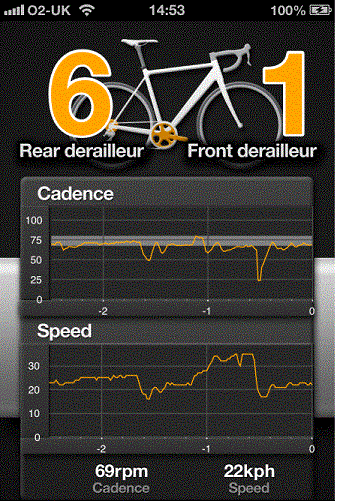
    A screen shot of the gear-changing iOS application

    How Automatic Transmission Works in Smartphones:

    The theme of this technology that works with smartphones is quite simple The UK engineers have cut down the cables between the switches and the gears and replaced them with a smart, low-energy version of Bluetooth designed for very long battery life. these are normally connected via cable to a lithium battery and gear switches on the handlebars.

    In manual mode, Bluetooth on the gear switch communicates with an iPhone in the rider’s pocket. An app on that phone then relays the rider’s commands to a Shimano electric gear shift system modified to receive Bluetooth signals.

    In automatic mode, a magnetic sensor on the main crank tells the app your pedaling speed – known as cadence – while a wheel sensor tells it your road speed. It then computes the correct gear and beams it to the Shimano mechanism. “It’s not difficult. The link between cadence and speed is the gears.

    Read Also: Google Project Glass – Smart Project by Google Revealed

    Price:

    Although Cambridge is looking for business partners who are interested in developing it commercially. There is no estimated price at this time, although the Ultegra version of the regular Shimano Di2 system sells for about US$$2,300.

    source:pics gizmag

  • Magic Finger Can Turns any surface Into Touch Interface

    Magic Finger Can Turns any surface Into Touch Interface

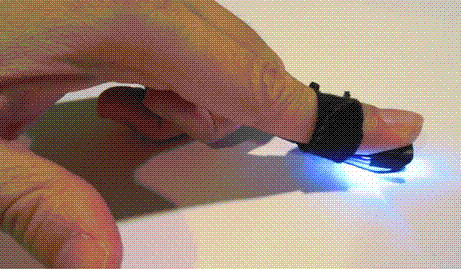
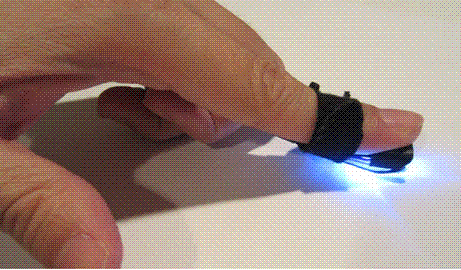
    Autodesk Research develops a device known as “Magic Finger” that can turn any surface into detect touch input device by shifting the touch technology from the surface to the wearer’s finger.

    This device is developed by the University of Alberta and the University of Toronto, is a small micro camera and optical flow sensor that attaches to your finger.

    The device can distinguish between surfaces like a desk, a piece of paper, or even skin, can recognize 2D data matrix codes, and also features a pinch function that can be programmed to trigger computer commands.

    In addition to input and control functions, the device can also be used for data transfers between Magic Finger units.
    magic finger

    Read Also:  Pebble iPhone Compatible Wristwatch

    How Magic Finger Can Turn Any Surface into a Touch Interface:

    On the ring, there are a pair of optical sensors. One is a low-resolution, high-speed sensor for tracking movement, which wouldn’t be very impressive because it makes the device just a mouse you strap to your finger.

    However, Magic Finger adds a new dimension with a high-resolution camera, which is able to detect 32 different surface textures with 98 percent accuracy. This allows the device to recognize what it touches, such as a leather bag or a table, or a magazine page, and with this information, turn various surfaces into interfaces for devices or a way of passing information.

    Practical Applications Of Magic Finger:

    One can use this device in a number of ways, depending on your requirements.

    • To remotely access or control mobile devices, especially smartphones.
    • Tap on the bag to mute a Skype call
    • Tap on the smartphone to send a frequent SMS message.
    • Using the logo of a t-shirt as a mode delimiter.
    • Tap the wrist to check an upcoming appointment.
    • Pinch gesture.
    • Data Matrix Buttons
    • Occlusion Free Input
    • Stickers as disposable remote controls.
    • Passing the texture to another Magic Finger.
    • Use Magic Finger as a periscope to check out the traffic.

    The Autodesk team hopes one day to make the Magic Finger into a self-contained device with appropriate miniaturization.

    When you reduce the size, you can attach the device to a ring or embed it under a fingernail or at the fingertip itself so that it is invisible and dormant.

    So next time, use this gadget to control your favorite devices remotely.

    Source: gizmag & dvice

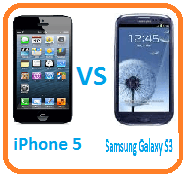
  • Apple iPhone 5 vs Samsung Galaxy S III

    Apple iPhone 5 vs Samsung Galaxy S III

    The Samsung Galaxy S III has been around the Globe since May 2012, and the iPhone 5 is also in the hands now; both have a sleek design and impressive look, but you should buy the iPhone 5 or the Samsung Galaxy S III. We’ve taken a look at the features of both phones, put them in the ring, and told them only one is coming out alive. Here’s how they fared…

    You will get a hands-on comparison between these two smartphones in today’s post.

    Comparison between Apple iPhone 5 and Samsung Galaxy S III:

    Let’s start with a comprehensive look at both smartphones, but first, take the display.

    Display:

    iPhone 5 – 4in IPS, 1,136 x 640 resolution

    Samsung Galaxy S III – 4.8in Super AMOLED, 1,280 x 720 resolution

    Every generation of iPhone since the original of the species back in 2007 has used the same size screen – 3.5in. That has all changed with the iPhone 5. It now has a widescreen 4-inch display of 1,136 x 640 pixels.
    iPhone 5 vs Samsung Galaxy s3
    It’s this change of screen style that will make the iPhone 5 able to offer a larger screen without making the phone any wider. Pixel density is the same as the iPhone 4S, too, although the new aspect will make it much better to watch movies on.

    On the other hand, the Samsung Galaxy S III cares a lot less about how wide it is than the iPhone 5. With a gigantic 4.8in the display, the Galaxy will be too wide for some hands – it’s a whopping 7.6cm across. Screen pixel density will be comparable to the new iPhone, though, with 720 x 1,280 spread across the display.

    Design:

    iPhone 5 – 7.6mm thick, metal casing, non-removable battery

    Samsung Galaxy S III – 8.6mm thick, plastic casing, removable battery

    Visibly seeing a huge size disparity between the two, the iPhone 5 is undoubtedly easier to grasp in the hand, seeing that it’s lighter in weight, skinnier in the frame, and not as cumbersome to hold in the hand as the Galaxy S III. In addition, it’s quite evident that the iPhone 5 is the more premium-looking device between the two, as it sports a brushed aluminum rear casing and sturdier construction. However, there’s no doubt in our mind that the Samsung Galaxy S III would probably handle a fall a lot better than its rival, mainly because its plastic body wouldn’t be as badly beaten up.

    Software:

    iPhone 5 – iOS 6

    Samsung Galaxy S III – Android 4.0 Ice Cream Sandwich (4.1 incoming), TouchWiz UI

    The battle of iOS versus Android is one we’ve been watching ever since 2008, when Android was born. Android has changed a good deal more than iOS in that time, and is finally getting close to becoming as slick and quick as iOS. Apple’s OS has always been pretty nippy.

    The Samsung Galaxy S III isn’t quite there yet, as in most territories it still uses Android 4.0 Ice Cream Sandwich ROM rather than the latest Jelly Bean version. Android 4.1 Jelly Bean ROM sees the start of an initiative called Project Butter. This is designed to take full use of the processor power available, to run Android at a solid 60fps.

    Power:

    iPhone 5 – 1GB RAM, A6 processor, power TBC

    Samsung Galaxy S III – 1GB RAM, Exynos 4412, Quad-core 1.4GHz

    One area where the Samsung Galaxy S III might beat the next iPhone is its processor figures. The Samsung Galaxy S3 uses the impressive Exynos 4412 chip, which has four cores and runs at 1.4GHz.

    Cameras:

    iPhone 5 – 8MP, LED flash

    Samsung Galaxy S III – 8MP, LED flash

    Although many elements of the iPhone 5 have been improved hugely over its predecessor, the camera has only been given a slight upgrade. It’s still an 8-megapixel sensor, and it still uses a pretty standard LED flash. Its aperture is f/2.4 and it uses a five-element lens. Like the iPhone 4S, the sensor offers backside illumination.

    The Samsung Galaxy S III has an 8-megapixel sensor and reams of features, including image stabilization, touch focus, 1080p video capture, and an LED flash.

    However, its image quality is at best on par with the iPhone 4S’s camera (and outperformed by it in some conditions), and we hope that the iPhone 5 will offer some significant improvements.

    The iPhone 5 also offers an impressive-looking panorama mode – just tap and pan to automatically create an image.

    Unlike other similar panorama modes, we’ve seen this one keeps the full-size image, giving you up to 28 megapixel images – nice.

    Battery:

    iPhone 5 – 1440mAh

    Samsung Galaxy S III – 2100mAh

    The iPhone 5 hasn’t gotten a huge battery increase over its predecessor. The iPhone 4S has a 1430mAh unit, and the iPhone 5 a 1440mAh unit. It’ll last for 40 hours of audio playback, or up to eight hours of talk time, with 3G enabled.

    Also, like previous iPhones, you can’t swap out the battery on the iPhone 5, so if you’re caught short without power, you’re done for… well, your phone is anyway.

    Samsung made a particularly strong effort with the latest Galaxy’s battery, outstripping most of its rivals by around 20 percent. For example, the HTC One X uses a 1800mAh unit and the Sony Xperia S a 1750mAh battery.

    Conclusions:

    The Samsung Galaxy S III is more flexible, with expandable memory and a more malleable OS. However, the metal body of Apple’s phone feels a lot more premium and is a much friendlier design for those with less than giant hands. And with the larger 4-inch screen, it won’t feel quite so tiny next to the Samsung Galaxy S III, either.

    The decision is in your court now that which one is user-friendly.

    via: Trustedreviews

  • Most Wanted Google Chrome Tips and Shortcuts

    Most Wanted Google Chrome Tips and Shortcuts

    Hi, I have come with the most wanted Google Chrome tips and shortcuts today, these will surely make your search friendly and move you across Chrome more effectively.

    You can bookmark any website with one click, can open any webpage without leaving any history, and much more. So you can also feel free to work online on your famous websites.
    So why are these keyboard shortcuts important, or why do we are in need the shortcut of our famous search engine Google Chrome?

    The question is quite simple, as we know that while using Google Chrome, sometimes we have to access the website area more quickly. So that’s why keyboard shortcuts are important.
    Read Also:

    Google Chrome keyboard shortcuts

    Most Wanted Google Chrome Tips and Shortcuts:

    Here is the detail of almost all the most wanted Google Chrome Tips and Shortcuts

    1. Open an incognito Window: By pressing Ctrl+Shift+N, you will open an incognito window; the site that appears in this window will not appear in the history and cookies. This short key is used especially when you do not want to know someone about the pages or site that you visited.
    2. Open a Link in Incognito Window: while roaming through the webpage, if you want to open a link in an incognito window, then right-click on the link and click to open the link in an incognito window.
    3. Want to Know about Most Visited Sites:  Do you want to know which websites have been visited the most? It is very easy, just press the Alt+Home keys from the keyboard and your most visited websites will be shown with thumbnails in the active window.
    4. Show your Recently Closed Tabs: pressing Ctrl+Shift+T will open your most recently closed tabs. Google Chrome remembers the last 10 closed tabs only.
    5. Bookmark a website quickly: Do you want to bookmark your favorite website or webpage quickly? then you are in the right place just click the star on the right side of the address bar and you have bookmarked.
    6.   History Page: By pressing Ctrl+H, you will get the history of your recently visited websites or pages quickly.
    7. know about Plugins installed: want to know about the plugins installed in your Google Chrome? Just type about: plugins and you will see the list of installed plugins.
    8. Display Home Button:  Google Chrome does not have a home button at its search bar, but do not worry you can easily add it, just follow: Click on the wrench icon at the right top corner > get to the “Customize” option for Chrome browser -> Preferences (or Options) -> Select the check-box for “Show home button in toolbar”  you have done.
    9. Use Chrome as Omnibox: Google Chrome has a special feature that leads one to easy conversions and calculations without leaving the window. You can also use the address bar like the search bar, just type the word and get the results from Google. In order to perform calculations, type your required question and get the answers,e.g, type 200+70  and press enter, it will give an answer with a lot of other options and links. You can perform the conversion, e.g, 20m in cm, and so many others like this.
    10. Google Chrome Browser Shortcuts: besides the above-stated, there are also some keyboard shortcuts to make navigation easy.
    • Ctrl+J – Go to downloads window
    • Ctrl+K – To search quickly in the address bar
    • Ctrl+L – Highlights the URL in the address bar (use this to copy/paste the URL quickly)
    • Ctrl+N – Open a new Chrome browser window
    • Ctrl+W – Close the current Tab
    • Ctrl+Tab – Navigate Tabs
    • Alt+F – Open the wrench menu (i.e Chrome settings menu)
    • Alt+Home – Go to the home page
    • Alt+Left Arrow – Go to the previous page from your history
    • Alt+Right Arrow – Go to the next page from your history
    • Spacebar – Scroll down the current web page

    source:thegeekstuff