Tag: SEO

  • How search engines evaluate the worth of your backlinks?

    How search engines evaluate the worth of your backlinks?

    Link building or getting backlinks is an exercise which every social media enthusiast and search engine optimizer do, in order to allow the maximum exposure of the website over several online frontiers.

    Not only does the practice of effective link building affects the search engine rankings of the web page, it is also crucial in driving more traffic to the website, and hence ensuring optimum exposure.how search engines evaluate worth of backlinks
    However, the very practice of link building has been plagues with a number of search engine algorithms and its very many changes. If you have been disturbed lately, trying to decipher how exactly does search engines administer the worth and quality of backlinks to your website, we come bearing good news for you.

    Factors search engines consider while evaluating the worth of backlinks:

    Below are 10 different points that contributes towards adding to the gravity and strength of the backlinks. Read ahead to discover these factors and hence forth ensure you don’t waste your efforts in getting the backlinks from the sites that are not worth it.

    1-The page rank of the page containing the link:

    Page rank is the Sun in the world of SEO – especially in the world of search engine algorithms. Regardless of any change in the algorithm, the search engines always consider the quality of the back link depending on the page rank of the web page it has been posted on. Thus, by default and try and get the links from high ranking pages with help of diligent and well constructed content.

    2-The authority of the domain:

    A domain such as that of Moz, with a high domain authority, is a nice way to upscale the quality of the link. The domain authority, especially the one taking place between the toolbar and the PR updates, contributes significantly towards the page rank. So higher the domain authority, the more worth the site links have.

    3-Links from trustworthy sites:

    If you can manage to get the link form a news site or an .edu sites, then it is going to factor rather nicely in the quality of link. By the rule of the thumb, such sites are highly trusted and hence carry more prominence.

    4-Links that are contextual:

    We are sure that you know better than to doubt the role of content in the field of SEO and link building, especially when we share with you another snippet of link quality – the links structure around a piece of content ranks much higher than the ones tucked away in the footer or the side bar area.

    5-Referring domains:

    It may be an extension to the above mentioned point. The link is going to account for a lot more, if it is published at a site that has a lot more referring domains.

    6-Limited outbound links:

    If your link happens to exist over a given page that already has a herd of outbound links, it will mostly be insignificant in shooting up the page rank and traffic of your website. Increased outbound links dilutes the quality of the page rank and also the link juice will be diverted to the pointing websites.

    7-Posting links on sites relevant to your niche:

    It might be a new emerging trend, but it surely is an important one. The relevancy of the domain containing your link, to your business factors in its quality, and also prompts Google to upscale the rank of such pages.

    8-No follow or do follow:

    A lot of popular blogs offer a no follow link without much hassle – do not be prompted to settle down for the same as no follow links are totally insignificant to your link building campaign, as such links are not considered by search engines at all. Always, and may we reiterate – ALWAYS ask for a Do follow link, and do not settle down for anything less than that.

    Must Read: Importance of backlinks in Search Engine Optimization

    9-Anchor texts and the keywords:

    Although this factor has not remained as important as it once was, but you may still want to ensure that the linking anchor text contains the targeted keyword, as this will eventually helps in building the strength and relevance of the link.

    10-Co-citations do matter:

    Google gives due importance to the link if the targeted keyword appears somewhere near to it in the content. Hence, try to factor this paradigm while developing the content and linking it to your website.

    This is all that we had for you today. We sincerely hope that you found the information shared here meaningful and that from now on, your link building campaigns would yield much improved results.

    Author Bio:Mike Swan is a specialist Web Designer at Markupcloud Ltd. He possess a huge experience in technology domain and loves all things comes under web Design niche. He is trying to spread his intangible knowledge to maximum people he can, in order to make a parallel platform.

    Read All Guest Posts

  • How to Install and Setup WordPress SEO Plugin by Yoast

    How to Install and Setup WordPress SEO Plugin by Yoast

    WordPress SEO plugin by Yoast is one of the most useful and 100%  free plugins for WordPress blog. It is one of the complete SEO solutions for bloggers with many new features.

    Although All in One SEO Plugin (AIOSEO) is also used by the bloggers, this plugin is considered as most SEO friendly, and alternatively will help to increase search rankings.

    In this article, I will show you how to install and setup WordPress SEO Plugin by Yoast and what should you do if you have already installed another plugin.
    wordpress seo plugin by yoast

    Before proceeding, Let’s see why I have preferred this WordPress plugin…?

    Why do we need to install an SEO Plugin?

    From the beginning of my blogging, I have been using the AIOSEO WordPress Plugin, but when I installed the WordPress SEO Plugin by Yoast, I came to know some amazing features that can not be found in another plugin like AIOSEO.

    So let’s have a look at them

    • Focus on the targeted keyword and show its Keyword Density.
    • Analyze the whole Post and show it how much it is SEO friendly
    • Google search results snippet preview
    • Meta Robots configuration, easy to add noodp, noydir meta tags.
    • RSS Footer/Header Configuration
    • XML sitemaps
    • Breadcrumbs support, with configurable breadcrumbs titles.
    • Pages or posts that have been noindexed will not show in XML sitemap (but can if you want them too).
    • Ability to verify Google Webmaster Tools, Yahoo Site Explorer, and Bing Webmaster Tools
    • .htaccess and robots.txt editor.
    • Permalink clean-ups, while still allowing for Google Custom Search.

    So after going through the above features, I am convinced to install and use this WordPress Plugin to make my blog Posts SEO Friendly.

    How to Install and Set Up WordPress SEO Plugin by Yoast:

    To get benefits from this plugin, first download this plugin. you can

    • Go directly to the WordPress site and download the WordPress SEO Plugin by Yoast, and then upload it using your Dashboard > Plugins > Add New > Upload
    • Go to Dashboard > Plugins > Add New > Search (WordPress SEO by Yoast )

    When you have installed this Plugin then it is time to activate it. But remember that

    if you have not used any other plugin (like AIOSEO ) then you need not to worry if you have already using one then before deleting the older one you have to import all you previous data to new plugin so that your old posts may be shown with same description,tags etc,and you have no to face any difficulty.

    How to Import Your Old data to the new WordPress Plugin:

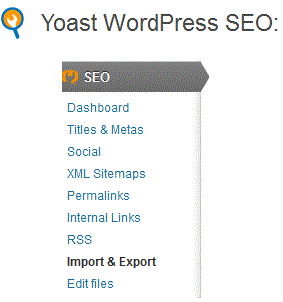
    After installing the plugin, you will see an icon with title SEO, just click it and you will have all the options listed.

    yoast wordpress SEO Plugin

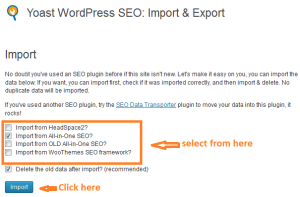
    Now click on the import & export options and check your desired option.

    yoast wordpress seo import & export settings

    1-Dashboard.

    Under this option, you will find

    • General: You can take a tour of that plugin and can also reset all options at any time.
    • Tracking: By checking this, all the other plugin changes like redirect and no index will be sent to the author, I have unchecked it.
    • Security: keep it checked
    • Webmaster Tools: You can use Google, Bing webmaster tools and Alexa verification Id, so that your site may be listed by these.

    after going through all the steps, click on the Save Settings.

    2-Titles & Metas:

    This is the most important part of the plugin, including the following

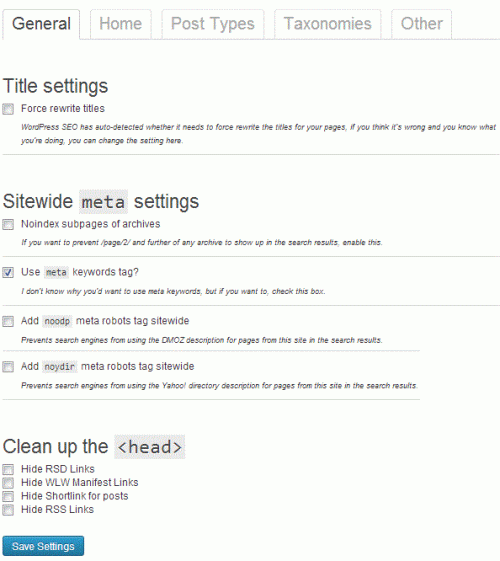
    • General: This includes Title settings,site-wide meta settings, and cleanup head. only check the use meta keyword tag option and leave others as it is and finally click save changes.

    seo by yoast meta and title settings

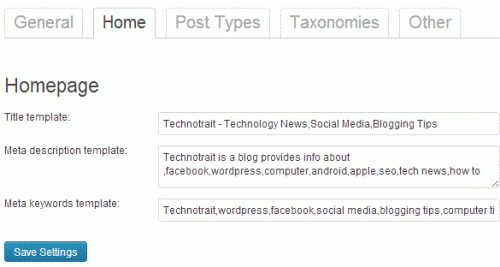
    • Home: by default, it has these fields are pre-filled with title-template, but you have to define your own, so just as like in AIOSEO  plugin, filled them properly so that the title, home description, and meta keywords can well explain your blog, it is also important because these settings will be later found by most of the search engines.

    Wordpress yoast homepage settings

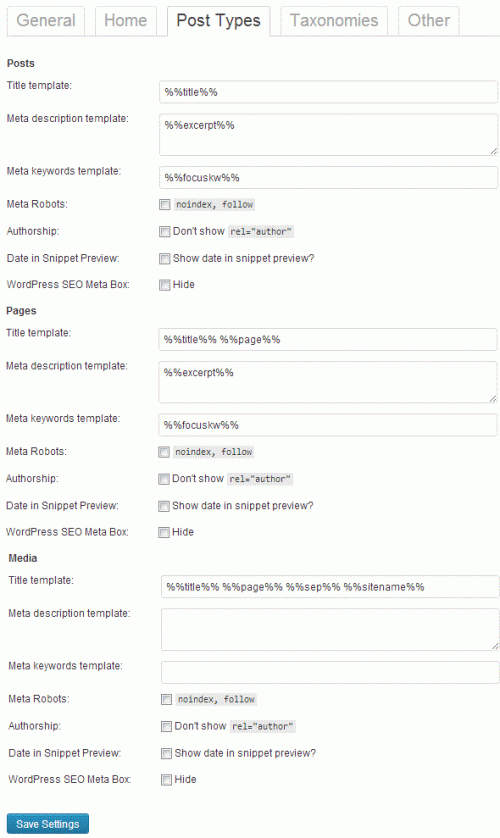
    • Post Type: by default, WordPress comes with a lot of predefined settings like posts, pages, revisions, attachments, and navigation menus. user can also define their custom post type. It is also recommended to use the post title option and leave the description blank. also while writing new posts, use each post’s description; otherwise, the search engines will consider your general home page description.

    Wordpress plugin Post type settings

    • Taxonomies:  If you do not have any description of categories, tags, or custom taxonomies, then it is recommended to leave this option as it is and move for next tab.
    • Others: this option has author archives, date archives, and special pages, it is recommended to check both options of meta robots and leave other settings as it and then save it.

    3-Social:

    This option includes the settings for famous social media sites, so fill them in. It also has your home image URL and its description also fill it with the desired image, and if you do not want then, just leave it blank, and your default title will be used.

    4-XML  Sitemaps:

    Yoast gives you the option to generate the XML sitemap; you can check it, but I recommend unchecking it and using the Google XML sitemap plugin.

    5-Permalinks:

    Permalinks are the URL both for the bots and visitors (but in most cases, bots), so you have to select them precisely.

    You will see 6 checkboxes, just check the 5th box of Remove the ?replytocom variables and uncheck all other boxes.

    while leaving the canonical settings as it is and click save settings.

    6-Internal Links:

    This section is not about the internal linking of your blog posts, but it is about the option of Breadcrumbs. You can use this option in the case to show site search results, giving your site an extra advantage in the search.

    7-RSS:

    In this, you will find two boxes. The one will show to Content to put before each post in the feed, and the second will show the content to put after each post. Just leave 1st option blank and confirm the second option has the lines containing:

    The Post%%POSTLINK%% appeared first on %%BLOGLINK%%.

    so save it.

    8-Import & export:

    You can use this option when you want to move from one SEO plugin to another.

    9-Edit Files:

    The last option will show the options of the Robots.txt and .htaccess files. This is my favorite portion (a little sensitive to cater) because you can edit both files without access to your database or c-panel (which can save a lot of time).

    WordPress SEO plugin by Yoast for Single Posts and Pages:

    The installation of the plugin is not sufficient, so the next and most important step is its proper use while creating a new post.

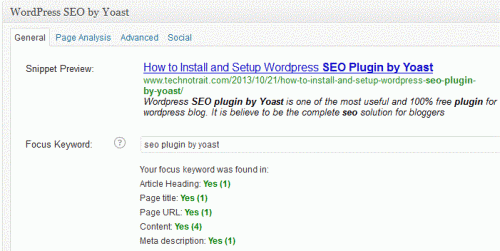
    So while writing a new post, you will see the page name by WordPress SEO by Yoast, so just enter a proper SEO title, focus keywords, meta description, and meta keywords.

    seo plugin for single post

    Hope so you will find the article useful while selecting the WordPress SEO plugin by Yoast. If you like the post and still have any query, then feel free to comment.

  • Will google hummingbird search algorithm affect your seo ?

    Will google hummingbird search algorithm affect your seo ?

    Google introduced a new search algorithm named “Hummingbird” last month. The new Google Hummingbird search Algorithm will make the search more relevant and precise than Google Panda & Penguin.

    At the 15 anniversary, Google claimed that the new search algorithm will provide more relevant knowledge to searchers – meaning the update has enabled Google to better understand the content it indexes than ever before. This will produce ease both for the content writers and for the publishers.

    Before proceeding let’s see what is special in the Google Hummingbird search algorithm…?

    google hummingbird

    What is Special in Google Hummingbird Search Algorithm:

    The thing is why Google has launched this search algorithm or what special thing the Hummingbird has brought for the websites and blogs…? The answer may be in

    •  Google wants to make searches more relevant and precise without wasting any time in searches.
    • Since most of the searches are now shifted towards mobile, so this will also make it mobile and smartphone friendly.
    • More focused on each word or query behind search rather than focusing on the search sentences.

    The things will be changed, just imagine a couple of years ago when one type to search something and may find many blue links and might be most of them were irrelevant and annoying, But after the hummingbird search algorithm your searches more” precise and relevant” so that users may find their search product in less time. The results will also be location-oriented, just to make the search better.

    Will the Google hummingbird search algorithm affect your SEO?

    Will the search results may be affected by the new algorithm…? the answer is yes because 90 percent of the search results will be affected due to this new Hummingbird…but in a positive sense, so the searches will be more accurate. Now the Google boats will first analyze the user keywords or search sentence word by word and then try to show more relevant results.

    So it will necessary for the writers to produce original and unique content. So that they may not affect the new algo in the worse way

    Actually, a hummingbird will not affect your SEO if you have not produced any duplicate content or spam links. if you find any decrease in organic traffic or in Page rank then it may be due to the previous Google algorithm updates.

    The things will be continued in the same way till

    then the things will be going in the same way and you need not worry. Because is here to help you in the right way, to keep you away from spammers …..

    You may be also interested in getting safe backlinks after the Google Algorithm update

    Do comments with your feedback.

  • 5 Things to Consider before accepting Guest Posts to Your Blog

    5 Things to Consider before accepting Guest Posts to Your Blog

    Since Guest Posts are a great source adopted by most of bloggers and webmasters so there are certain things to remember before accepting guest posts to your blog.

    It needs a little and timeless effort to accept and publish guest posts, and in return, they provide one or two backlinks to the Guest author. It was a famous practice and many bloggers have increased their Google Page Rank as well as traffic due to it.

    It is also as important as earlier, but now bloggers have changed the policy while accepting guest posts due to cheap content.t Google Penguin has penalized such blogs/websites that were accepting these kinds of infamous author posts, and alternatively, all those blogs have lost their rankings as well as traffic. It is also important that once your blog is penalized by Google then it will be considered in his blacklist.

    Must Read: Google Panda Update Recovery Tips

    But you need not worry because I have compiled important points that may help you while accepting guest posts.

    5 Things to Consider before Accepting Guest Posts for Your Blog:

    After receiving the niche-related guest posts, it is important to consider the following points before publishing them.things to consider before accepting guest posts

    1- Ensure Content Plagiarism:

    It is very easy for anyone to use duplicate content or content copied from other famous websites for guest posting, but remember that this kind of spammy content will not only harm the guest author’s rank but will also penalize your blog.

    So just ensure that the content should be non-plagiarized, unique, and never at any other blog or website.

    There are a lot of free websites that may help to check the duplicate content; the most famous are Copyscape and Plagtracker.

    2 – Read Post Thoroughly before publishing:

    When you are ensuring that the content is unique then next you have to read posts carefully, just to check whether the content is SEO friendly, if you feel any shortcomings like sentence structure, grammar, keyword density, or any other thing then just remove it and make it SEO friendly.

    3 – Add relevant Picture and Video:

    Sometimes the guest post does not have such an attractive picture, or it may need any video to elaborate so just do not forget to add a relevant picture or video(whichever is necessary) just to add more value to it.

    Read Also: Most Common SEO mistakes to avoid

    4 – Double Check the Backlinks source:

    As the Guest Post author required backlinks, one or two in the post body or in the author bio, so it will provide you the links. It is most important to check/visit these links and check the following things,

    • Google Page Rank (it should be higher or at least 1 or 2)
    • Alexa Traffic Rank (it should be as low as possible, ideally below 200000 ), you can add Alexa toolbar and any other to check Rankings
    • Author Rank
    • Google Penguin and Panda effect

    If you feel anything unnatural, then feel free to contact the guest author and ask him to provide another link, or in other cases, do not accept the guest post. It is better to add a Guest Post Guideline Page for the guest author, just to save time.

    Read Also: How to build quality Backlinks after Google Penguin Update

    5 – Add anchor text and other inbound linking:

    Since the guest blog author will only give you the post, the next thing is to add some relevant anchor text and inbound links, such as Related posts, so that you can make it a part of your other posts.

    Be selective in the use of anchor text because if it used as another place within your blog more than two or three times, then it may fall into spammy activities.

    Remember that after publishing the post, you will be the owner of i,t and all credit or loss will have to face you.

    It is Your Turn: What do you think is enough to consider these things while accepting guest posts or do you still have some innovative ideas, do share for me and for others.

  • 6 Killer Tips to Increase Your Blog Comments

    6 Killer Tips to Increase Your Blog Comments

    Do you want to know the killer tips to increase your blog comments? If yes, then this is the right place for that. Because I have compiled such proven ways that will surely help you to catch the attention of visitors and help to get of useful blog comments.

    Before proceed, let’s see why you are worried about the blog comments..?

    Think you have written killer content, have made effective seo, social media marketing…..but even then you did not have many comments or have few ones…..if the conditionis  so, then something is missing or not well planned.

    So do not worry , just stick here to increase your blog comments.

    6 Killer Tips to Increase Your Blog Comments:

    Below are the proven tips to increase engagement on your blog.

    1-Write Unique, engaging, and thought-provoking content:

    You are not alone in this blogging community; there are thousands of others (maybe most of them are more experienced and renowned) who are contributing with their content, so why will a reader or a visitor stay on your blog to read further or go through the entire content?tips to increase blog comments

    It is the content that will attract the visitors and will change them into readers.

    Content that resonates with your audience is key to fostering engagement. Focus on topics that address problems, provide answers, or stir emotions. Share unique insights or personal stories to build a connection with your readers. Controversial or debatable subjects can spark discussion, but handle them with care and respect.

    2-Ask for Comments:

    If you have given seo optimized and useful content to your readers, then don’t be shy to ask a question of your readers. But your words should be soft, for example:

    Do give me feedback with your valuable comments

    If you have any queries, leave comments

    What will you say about the content? Do share your comments

    Read Also: SEO Checklist To Make Blog Search Engine Friendly

    3-Respond to the Comments:

    It is a good habit to check your pending comments from time to time(at least twice a day) and answer them regularly.

    Why ..? because your blog commentators will expect their query as soon as possible. Because when you do not respond to them, then you will ignore them and alternatively, they will never come to comment again, so why should you wait? Just give honor to them and make a reasonable answer so that they will be encouraged to come and comment again. But be productive in your reply, and feel free to face any

    Read Also: How To Comment To Boost Your Traffic and Google Page Rank?

    4-Reward Top Commentators:

    You should always encourage your readers, and they must find something different at your blog. So always encourage your readers to give feedback by useful comments as much as they can, for this you can reward them with some giveaway, or you can simply add top commentators widget and display your top commentators. It will encourage others to post comments and will bring an environment of competition and alternatively, you will get endless benefits…..

    5- Build a Relationship with your replies:

    Try to build strong social relationships with your readers through your replies.

    • Leave a reply with some unique words.
    • Encourage them to visit again and give them some useful and unique tips.
    • Visit their blog and give quality blog comments there,but should be natural and avoid spam comments.
    • Try to solve their problems(if any) by inviting them to contact you through email, for thi,s you can have a contact me form.

    6-Use the comment Luv plugin:

    The major reason of blog commenting is to increase the backlinks, have some increase in Google Page rank, anda  good relationship with other niche blogs.

    I have noticed the blogs with a higher blog comment rate that have installed the Comment Luv Plugin.

    Why..? because it will give a chance for the commentators to display their latest blog post along with the comments. So people will be encouraged to leave comments on your blog.

    Now it is your turn to have some comments or if you know some other ways to increase blog comments ,then do share for me and  for others.

  • How to Find out the Top Rankings Keywords Of your Own Blog Using Google Analytics

    How to Find out the Top Rankings Keywords Of your Own Blog Using Google Analytics

    Keywords are the most effective part of blog content, the selection of the right keywords will not only make your content search-friendly but will also help to improve the Google Page Rank of your blog. In today’s post, I will explain a simple and important way to find out the top-ranking keywords of your own blog by using Google Analytics.

    This method will give you a chance to focus your top-ranking keywords and hence may also help to increase organic tratop rankings kewords using google analyticsffic by using them properly. It will also a guideline for the new bloggers, who are just wondering to use these keywords effectively. Although there are some paid WordPress plugins and other sources to find keywords but this method is totally free and effective.

    Before proceeding further, let’s talk about the importance of Google Analytics:

    Google Analytics is a great and free open-source tool by Google helps publishers in many ways.

    whenever you apply for any ad network they will ask to provide visitor detail by using Google Analytic, it will also help to track visitors, their tendency, interest, social media traffic ,part of direct and referral traffic, Site speed,site search,in page Google Adsense overview and many many other useful techniques for the bloggers.

    Read Also: How to get targeted keywords for better seo

    How to Find out the Top Ranking Keywords Of your Blog Using Google Analytics:

    We already know that Google Analytics is the most popular open-source source by Google. It can help to make blog rankings better in many ways,the method I am going to explain will track the top-ranking keywords of your blog. it is also important in terms ofthe  recent Google Penguin update in which many blogs have lost their top keywords rankings.

    So here are the easy steps to find top rankings keywords of your blog.

    • Sign in to Google Analytics and go to the Dashboard.
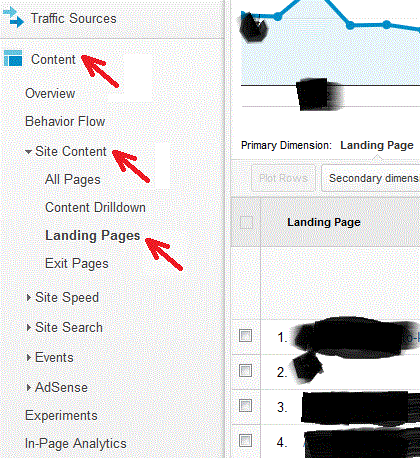
    • Go for Content > Site Content > Landing Pages

    top rankings keyword research

    You can see your top 5-10 pages of your blog that can be seen to most of your visitors.

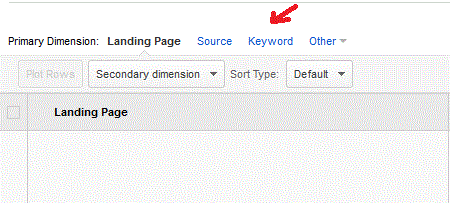
    Just click on any of the page to see its top keywords or the keywords for which the page is getting more readers. Select Keyword from the top tab.

    keywords using Google Analytics

    You can see the keywords searched by most of your readers, including total visits, visits/page, and Avg. visit Duration, new visit,s and the bounce rate.

    So you will get a handsome report on which keywords are getting more new visitors or which ones are losing traffic, and in this way you can manage your blog content by focusing on these keywords.

    You may also be interested in:

    Final words:

    So you have found the easy way to get top-ranking keywords using Google Analytics, feel free,if you have any query.

  • 3 Safe ways to get Backlinks after Google Penguin Update

    3 Safe ways to get Backlinks after Google Penguin Update

    Getting safe Backlinks by keeping in view Google Panda or Google Penguin update is really important as well as a challenge not only for the blog but also for the bloggers. Especially if you are a pro blogger and want to introduce your blog content to other internet lovers.

    In order to get backlinks, you may use different SEO techniques without knowing whether it is white hat or black hat SEO.I t was a good practice but after the Google Penguin update in the last month of May,2013,

    It is no longer exists among the famous and top bloggers, because these kinds of methods have not only harmed their PR but also decreased their blog traffic and  Google has penalized many blogs that were involved in spam link-building activities.Google Penguin safe backlinks

    So what should we do now…should we hire an seo company or search for some other way to get backlinks for our blog?

    You need not worry because I have compiled Google Panda and Penguin safe ways to get quality backlinks that will not only increase the blog traffic but will also boost your Google Page Rank.

    Read also:

    3 Safe ways to get Backlinks after Google Penguin Update:

    Building backlinks for your blog is not so difficult; it requires consistency, patience, and hard work, and most new bloggers just put it behind and become victims of spamming.

    So, keeping in view, here are the 3 safe ways to get backlinks that won’t be affected by the Google Panda or Google Penguin updates.

    1-Getting Backlinks from Guest Blogging:

    Guest blogging is one of the safest and easiest ways to get backlinks for your blog. With guest blogging, you will get free, natural, permanent, and Google Penguin-safe backlinks. It is as easy as 123

    1. Write a unique and compelling article along with an author bio
    2. search for your niche blogs
    3. Submit this to one of the high PR blogs and get Backlinks.

    After the Google Penguin update, most of the blogs made guest blogging rules stricter. So, if you are the webmaster or the owner of a blog, then just keep in mind that you should not accept such blog links that are penalized by Google or have a low rank. Because Google Penguin update noticed and penalized such blogs that have poor links or are involved in any spam link exchange scheme.

    2- Backlinks by Blog Commenting:

    This is one of the most popular ways to get backlinks because it need not so much effort as like in guest blogging but just you have to find your niche blogs and have some good and meaningful blog comments. This method will help in many ways

    • By reading the article, your knowledge about the specific topic will be updated.
    • By commenting, you will get a free backlink.
    • Some cum luv enable blogs to give you a chance to show your latest post, along with the comment
    • Twitter link is also an optional backlink for you.

    Most of bloggers find it easy to have comments on blogs and get backlinks in return. But all you need is patience and consistency. This method will not only provide you with a free and permanent backlink but will also increase your Google Page Rank.

    Read More about Blog Commenting

     3- Backlinks From Forums:

    Forums are another popular way to get instant backlinks. Nearly all the forums provide the signature option under the profile section. so you have to add your blog URL there. This will give you a backlink.

    You can also share your thoughts in some forum discussions and try to solve the problems. This will not only make you popular but will also induce readers to check your profile, and chances are that they will visit your blog.

    Read also:

    There are many high PR forums available , just find your niche-related forums or you can type “Your-niche+Forums”  for example if you want to search for seo forums, then just type “seo+forums” and hit enter and go for high PR forums search to get Backlinks.

    These are the simplest ways to get free and instant backlinks. Do you have any other ideas then do share.