Tag: SEO

  • Top 10 SEO Forums List To Increase Blog Traffic

    Top 10 SEO Forums List To Increase Blog Traffic

    The Top SEO Forums List to Increase Blog Traffic is the topic of today. We know that the purpose of Search Engine Optimization (SEO) is to bring your blog to the top ranking of search engine Results and, alternatively, become a source to enhance blog traffic; for this, many tactics are widely used. Although I have used the top social media sites to fetch the blog traffic still this topic of today has great importance to increase blog traffic. I have personally used and am still using it to increase my SEO.

    Why SEO Forums are Important:

    Why SEO forums submission and participation are important. As we know that forums are the best place to share knowledge.

    The people around the globe and of different opinions are there to talk, share, and even solve the problems regarding SEO and other tactics, so it is very easy for someone to have all these things.

    So exactly what happened when you have something new regarding your website or blog in the form of a post and article, then sharing this info will be seen by thousands of visitors, and surely when you place a link, then thousands of people will visit your blog, and you have a permanent source of a backlink from these forums.
    top seo forums list

    Top 10 SEO Forums List:

    There are many SEO forum sites out there. What you want is an SEO forums list with a large and active community of web designers, web developers, and SEO practitioners. Here are some best SEO forums lists that are worth taking a look at. The forums are arranged according to Google Page Rank and are mostly from Google Page Rank 6 to 3.

    The list of SEO forums was established on the current date, and data was collected from the web.

    1. Sitepoint     [http://www.sitepoint.com/forums/ ]   6/10
    2. Digital Point     [http://forums.digitalpoint.com/]   6/10
    3. SearchEngineWatch    [http://forums.searchenginewatch.com/]   6/10
    4. V7N Webmaster forum    [http://www.v7n.com/forums/seo-forum//]    6/10 
    5. Webmaster World    [http://www.webmasterworld.com/]    6/10
    6. SEO Chat    [http://forums.seochat.com/]    5/10
    7. SEO forums    [http://seoforums.org/]     5/10
    8. Warrior Forum    [http://www.warriorforum.com/]    5/10
    9. Wicked Fire    [https://www.wickedfire.com/]    4/10
    10. Reddit (SEO Section)   [https://www.reddit.com/r/SEO/]  3/10 

    All these forums will keep you busy for some time.

    After all, SEO is a big topic, and there is a lot to learn. And if you are already an experienced SEO practitioner, why not help others out by sharing your knowledge and expertise? You will build up your online reputation as an SEO expert.

    Many forums will allow you to advertise a signature link, and you may even get one or two clients looking for your SEO service.

    So I have shared the top SEO tools, sites that will surely help to increase backlinks and traffic by posting content, if you have any others that need to be included or replaced in the above-mentioned list that does comment.


  • Increase Google Page Rank With This Simple Tip

    Increase Google Page Rank With This Simple Tip

    Google Page Rank plays a vital role in Search Engine Optimization (SEO )and organic traffic of a blog. I am going to share a simple tip to increase Google Page Rank today.

    As we know that Google Page Rank shows the popularity of a blog.The higher the Rank the more its popularity. If you have installed Google Toolbar on your browser, then you can easily check your blog PR.

    Let’s come to the topic and have a simple way to increase Google Page Rank.

    Read Also:  Top 10 Social Bookmarking Websites by Google Page Rank

    While making websites or even web pages we usually use a language like  HTML.but we do not take much effort to validate its code. That may bring a major reason for low Rank.
    increase-google-page-rank.gif
    So, after making websites, even no,w one can validate the HTML code of one’s website.

    Increase Google Page Rank With These Simple Steps:

    • Go to W3 Markup Validation Service and check the HTML code of your website or blog.
    • Try to remove all the errors, warnings that appeared.
    • That’s all you have done

    So when you validate the code of your website, then Google bot will read your page completely and thoroughly, and as a result, your Google Page Rank will increase.

  • How to get Targeted Keywords for better SEO

    How to get Targeted Keywords for better SEO

    Getting targeted keywords is just like the backbone of any blog or website. It is not only helpful in better Search Engine Optimization (SEO) but also a key to getting handsome organic traffic.

    In today’s article, I am going to guide you on the method of getting the right targeted keywords for your blog in different easy ways, and also tell you why these keywords are so important for your blog or website.

    Before getting to the topic, first see what the keywords stand for.

    What are keywords?

    When talking about the blog or website, the keywords usually come with a variety of meanings, the main of them are:

    1. Keywords can be defined as the specific terms used by a person to search for something in a search engine. For example, if you want to know about the term technology, then the search engine will display all the websites/blogs, or descriptions related to technology.
    2. In regard to search engine optimization (SEO), keywords are the exact phrases or words used by advertisers to get their targeted traffic.
    3. For pay-per-click advertising (PPC), keywords are defined as words used by prospects for which advertisements can be created and placed on search engines. In this sense, keywords are defined broadly. Because of the way PPC platforms like Google and Overture work

    How to get Targeted Keywords for better SEO:

    I have defined the three main perspectives mainly used on the internet. But as bloggers, we should focus on such types that can bring quality and targeted traffic to our blogs. For this the all three definitions will be adopted but in different ways.

    There are many sources of getting traffic, but the most important and useful is organic traffic.

    What should we do to have targeted keywords in order to get targeted traffic?

    The following two ways are commonly used

    Use Google Webmaster Tools to get targeted Keywords:

    Using Google Webmaster Tools is easy and commonly used by most webmasters.

    Just go to google webmaster tools (www.google.com/webmasters/tools ) log in to your account > click your website that you have added ( if not then just add it, it is easy ), next you will see the list of keywords searches regarding your website > select the most search keywords and use google adwards explained below to search for the keywords. This is the most appropriate method to rank well in Google search and to get targeted traffic.

    Use Google Adwords to get targeted Keywords:

    Google AdWords is a famous and old method of getting targeted keywords, although its name has changed now to Google Keyword Planner.

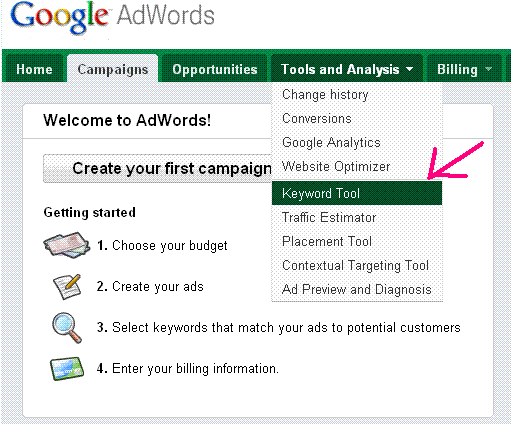
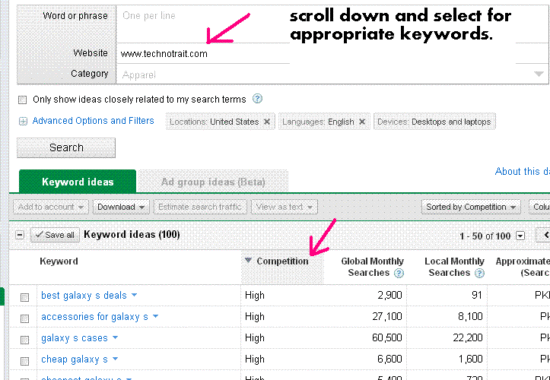
    First, log in to your Google AdWords account > Go to Tools and Analysis > click on Keyword Tools, you will get a new window like below.

    Here you will see the options of the website, go and write the name of your website, and press search. A list of all possible keyword phrases will be displayed.

    Click on the column option and check the “competition “.Now your keywords will be in the order of high, medium, and low search.

    Choose such keywords that have three qualities.

    1. Most relevant to your blog/page or website.
    2. Have comparatively low competition
    3. And get a high local and Global Monthly search.

    Choose five to seven such keyword phrases.

    How to use Targeted Keywords for better SEO:

    After getting targeted keywords next step is to use them properly. A WordPress blogger can use these keywords as meta tags in the header.php file and can also use plugins like All-in-One SEO.

    You can also use these keywords while writing an article or post, but one thing to keep in mind is their keyword density.
    In this way, one can use the targeted keywords and get better search engine Rankings with a lot of organic traffic.

  • Easy Ways to check backlinks of your website-blog

    Easy Ways to check backlinks of your website-blog

    Backlinks, often referred to as inbound or incoming links, are simply links that connect one website to another. When it comes to search engine optimization (SEO), backlinks hold a lot of weight because they act like a vote of confidence from one site to another. To put it, when a website links to another, it’s essentially saying, “This content is trustworthy, helpful, or worth your time.”

    Want to know the easy ways to check backlinks of your website/blog? If not, then don’t worry, I am here to guide you on the ways of checking backlinks.

    In my previous post, I have already discussed the importance of backlinks to generate traffic and ways to create backlinks. including search engine optimization (SEO).

    Must Read: How Search Engines Evaluate the worth of backlinks

    Easy Ways to check backlinks of your website blog.

    check backlinks
    There is a different method of counting backlinks of different services and tools, so one tool may show you the number of backlinks, and other tools show different numbers of backlinks. So don’t confuse, keep doing your good work, and improve SEO and page rank.

    So here are the famous ways to check the backlinks of your website.

    Read Also: Why Backlinks are important

    1. Google Analytics: Google Analytics is the most powerful and SEO-friendly way to check the backlinks of your website. It can provide you with a list of not only the backlinks to the site but also the best-performing backlinks. So next time, when you visit the site, you will see such sources to find backlinks from places you did not even know existed.

    1 . Use filters (excludes/contains keyword) to find interesting sources.
    2. Check which backlink gives you more traffic and why.
    3. You can also invest time to improve such fields of areas that give you a lot of traffic.

    2. ahrefs: This site has powerful features for finding backlinks, including total backlinks, backlink types (text,nofollow, image, frame form, etc). Ahrefs will also show you which backlinks you have lost and which ones are new with URLs.

    3. Bluebacklinks:- Bluebacklinks is also a good website to check your website’s backlinks.

    4. Webmaster-toolkit: – Webmaster-toolkit is a free Link Popularity Checker Tool, and it shows the Number of Links in different search engines of your website.

    5. MajesticSEOMajestic SEO has the largest publicly available index of its kind. It has by far the freshest data of its kind, with an index


    6.SEOMoz: SEOMoz is a wonderful collection to check backlinks, SEO, and much other useful content.

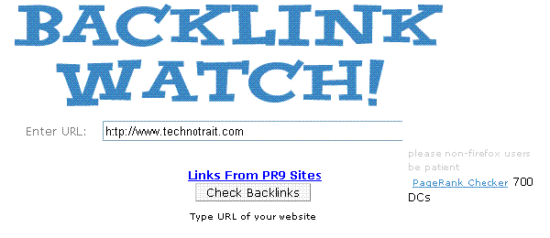
    7.BacklinkWatch: another online free tool to check backlinks.

    Hope you will like the post.

    Don’t Miss: How to check the backlinks of your website easily

  • How to Optimize your blog images to enhance SEO ?

    How to Optimize your blog images to enhance SEO ?

    Hi friends, today I am going to tell you how to optimize your blog images to enhance SEO….the question is why it is important …?

    The question is quite easy and important because SEO (search engine optimization ) is the way to increase website ranking, to increase traffic to your blog site.

    A lot of people use Google Image Search to find images for a variety of topics.

    In Google’s webmasters’ guidelines, they encourage webmasters to use alternative text for the images.

    Also, highly relevant images show at the top of Google’s search results page when they match the search query, which can bring more search engine traffic to a site. Just see the picture below

    You can see in the above picture that I have searched for “Android Phone” and the images search shows the famous links, just note the big one mouse pointer picture, the name of the search words is included in its name, and similarly for the other images too.

    How to Optimize your blog images to enhance SEO

    So, keep giving this, it is very easy to make your images familiar with the world by the following simple techniques

    1. Name Your Images

    Whenever you add some image in your post/article, change its name relevant to your post…for example, in my post I will use imageseo.jpg instead of 21.jpg or whatever the computer suggests.

    2. Use relevant text around your images.

    To use the blog images, make sure there is some descriptive text before or after the image just relevant to the image.

    3. Use a keyword in your Alt text.

    Alt stands for alternative text. This is the most important thing in image optimization. You should include a keyword or phrase that is relevant to the image, but take note that you should not stuff it with keywords that many inexperienced webmasters do and unethical SEO’s do to avoid penalties from Search Engines.

    You can also use alt tag plugin(if you are using WordPress) to make it clearer. Here’s how it looks:

    <img src="imagename.jpg" alt="descriptive text here">

    4. Use anchor text keywords in image links.

    Anchor Text is a keyword when linking to a specific image instead of using Click to View Full Size. You can use something like images or the name of that picture.

    5. Use a better image extension

    When naming your image, it is important to name it in the format of .jpg or .png, or .gif  because these are the most searched image extensions.

    6. Use the Social Site Tag for your images.

    If your images have little or no textual content, it would be more helpful to tag them using social tags like Technorati or else. It adds more weight to your image to help it rank better.

    You can also use your site name with the image name.

    7. Use a reliable photo-sharing hosting

    Use reliable photo-sharing sites like Flickr and tag your images.

    These are some ways to optimize your blog images; there may also be many other ways, and I am waiting for your response for more tips.
    via:freeseotipsandtricks

  • Increase Blog Traffic by Free Directory Submission

    Increase Blog Traffic by Free Directory Submission

    A Blog or Weblog is one of the best ways to share information among People around the Globe.

    Most important is the number of blog lovers, and it is possible only when your weblog or blog is known by the famous search directories or search directories.

    Like Google, MSN, and Yahoo, there are also hundreds of Directories that provide a way of handsome traffic to your blog.
    From an SEO point of view, search engines love blogs as they get updated frequently.
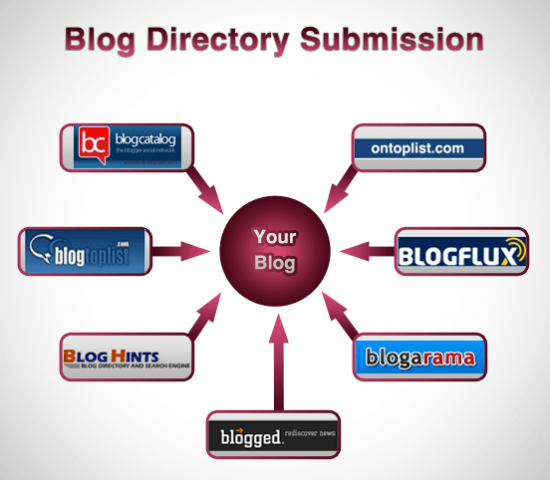
    increase blog traffic by free directory submission
    If you are a business owner, then starting a blog can help you widen your customer base, help you get feedback instantly, which is very helpful in developing an effective business strategy

    LIST OF FREE BLOG DIRECTORIES TO INCREASE BLOG TRAFFIC:

    Keeping in mind the above-stated lines as in my previous post of increased blog traffic, here I have presented the list of top directories with their Page Rank (PR 9) TO (PR 0).

    (The ranking is calculated at the time of posting the article)

    I hope it will increase blog traffic.

    (Please copy and paste the address to follow)

    http://www.bloglines.com/index.html (PR 9)
    http://www.technorati.com/ (PR 8)
    http://technorati.com/blogs/directory/ (PR 7)
    http://www.today.com/ (PR 7)
    http://www.globeofblogs.com/ (PR 6)
    http://www.icerocket.com/ (PR 6)
    http://www.placeblogger.com/ (PR 6)
    http://www.blogpulse.com/index.html (PR 6)
    http://blogs.botw.org/ (PR 6)
    http://portal.eatonweb.com/ (PR 6)
    http://www.9rules.com/ (PR 6)
    http://www.blogcatalog.com/ (PR 6)
    http://www.bloghub.com/ (PR 6)
    http://www.bloggernity.com/ (PR 6)
    http://www.blogged.com/ (PR 6)
    http://www.bloggapedia.com/ (PR 6)
    http://www.blogdigger.com/index.html (PR 6)
    http://www.ontoplist.com/blog-directory/ (PR 6)
    http://www.blog-directory.org/index.php (PR 6)
    http://www.blogarama.com/ (PR 6)
    http://www.dmegs.com/ (PR 6)
    http://www.highclassblogs.com/ (PR 5)
    http://www.sarthak.net/blogz/index.php (PR 5)
    http://blogskinny.com/ (PR 5)
    http://www.bloggingfusion.com/ (PR 5)
    http://www.indiblogger.in/ (PR 5)
    http://www.blogdire.com/ (PR 5)
    http://www.topbloglists.com/ (PR 5)
    http://www.lsblogs.com/ (PR 5)
    http://www.bloghints.com/ (PR 5)
    http://blogville.us/ (PR 5)
    http://www.bloggeries.com/ (PR 5)
    http://www.bloguniverse.com/ (PR 5)
    http://www.myblog2u.com/ (PR 5)
    http://www.blogdire.com/ (PR 5)
    http://www.bloggernow.com/ (PR 5)
    http://www.getblogs.com/ (PR 5)
    http://www.buzzerhut.com/ (PR 5)
    http://browseblogs.com/ (PR 4)
    http://www.thevital.net/ (PR 4)
    http://www.biggerblogger.com/ (PR 4)
    http://www.blogio.net/ (PR 4)
    http://www.quickblogdirectory.com/ (PR 4)
    http://www.blogpoint.com/ (PR 4)
    http://www.blog-watch.com/ (PR 4)
    http://www.blogadr.com/ (PR 4)
    http://www.blogdirectory.net/ (PR 4)
    http://www.expat-blog.com/en/directory/ (PR 4)
    http://www.herblogdirectory.com/ (PR 4)
    http://www.blogbar.net/ (PR 4)
    http://www.addurlblog.com/ (PR 4)
    http://www.blogdust.com/blog-directory/ (PR 4)
    http://www.blogbunch.com/ (PR 4)
    http://www.blogsthatfollow.com/ (PR 4)
    http://www.blogtoplist.com/ (PR 4)
    http://followlist.com/ (PR 4)
    http://www.flookie.net/ (PR 4)
    http://www.iblogbusiness.com/ (PR 4)
    http://www.wilsdomain.com/ (PR 4)
    http://www.bloglisting.net/ (PR 4)
    http://www.spillbean.com/ (PR 4)
    http://www.totalblogdirectory.com/ (PR 3)
    http://www.delightfulblogs.com/ (PR 3)
    http://www.bloggerhq.net/ (PR 3)
    http://blogannounce.info/ (PR 3)
    http://www.blogshaven.com/ (PR 3)
    http://www.blogfolders.com/ (PR 3)
    http://www.blogbal.com/ (PR 3)
    http://www.blog-search.com/ (PR 3)
    http://grokodile.com/ (PR 3)
    http://www.righttracker.com/ (PR 3)
    http://www.blogwebdirectory.com/ (PR 3)
    http://www.bestblogs.org/ (PR 3)
    http://www.ablogin.com/ (PR 3)
    http://www.marketingscoop.com/addblog.htm (PR 3)
    http://www.blogpopular.net/ (PR 3)
    http://www.blogdirectorysubmission.com/ (PR 3)
    http://www.readablog.com/default.aspx (PR 2)
    http://www.blogtagstic.com/ (PR 2)
    http://www.surrealblog.com/ (PR 0)
    http://www.2searchblogs.com/ (PR 0)

    So the above-mentioned list of blog directories will help to increase blog traffic.

  • All In One SEO Plugin

    All In One SEO Plugin

    While blogging, we use different kinds of WordPress plugins to promote, some of them are unique and helpful. In this post, I will introduce and guide you to one of the famous plugins mostly used by maximum bloggers is ALL IN ONE SEO PLUGIN.

    all in one seo plugin
    img src=quickregister.net

    Most of us might have knowledge about the plugin under consideration, but some do not have enough knowledge to use this plugin efficiently to maximize the SEO benefits. This is the best method used for offline SEO by many bloggers.

    How to install and set up All in One SEO Plugin:

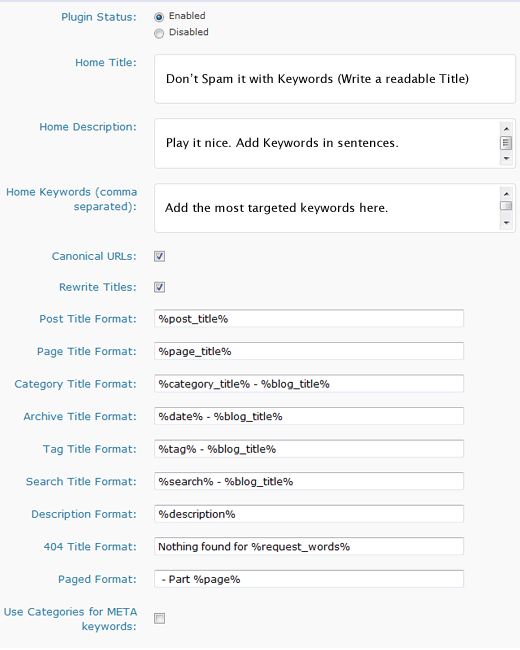
    First of all, I will show you the settings that I have used in my blog, technotrait. Once you have installed the plugin, go to Settings> All in One SEO. There you will see something like this. Make sure you have the plugin enabled.

    Here, I will discuss some of the basic details that I have used and feel necessary for every successful blogger.

    Home Title:

    Home title is the basic meta title on your home page. Visitors will see this one at the top of the site in the title bar. You have to be careful while writing this one because it is the welcome statement of your blog.

    Use the title that best shows the objective and purpose. For example, I have a blog on technology, so I have used the title as

    technotrait – blog about technology news, Social media, and blogging tips.

    When you are writing your title, make sure that it is under 60 characters and you think it all the way.

    Home Description:

    Home description is also known as the meta description.

    People usually do not see this description while visiting the site, but they can only see it while searching on search engines like Google.

    While writing the meta description, it must be in our minds that it should be below 160 characters, because most of the search engines only show the first 160 characters.

    Secondly, it must be smart enough to describe the contents of your website precisely. One should keep in mind that the description is the summary of your website.

    Home Keywords:

    Home keywords are the third important thing, and some of the experts consider it most important (I also). I have explained well about the keyword density and the keywords in my previous post.

    So, how should you choose the keywords? Use those keywords that best describe your website/blog, or which u mostly used in your blog.

    Don’t Miss: How to install and set up WordPress SEO by Yoast Plugin

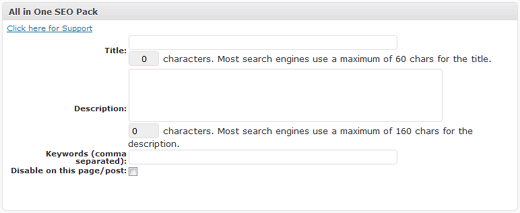
    Individual Post Settings: In you add a new post, a new tab will show you that says All in One SEO Pack, and looks like this

    Follow the same guidelines to install and set up the All-in-One SEO plugin. Now, click the link given below. Download and enjoy your SEO friendly blogging.

    Download All-In-One SEO Plugin

    Or want to go for the Pro version, then feel free to download the Pro version of the All-in-One SEO Plugin